Update

Changelog

Last Updated: November 22, 2026

Revision history

VersionDateChanges
v3.5.0Stirling Office Convert and desktop reload fix
v3.4.0Text editor in viewer, OneDrive, SCIM and accessibility checker
v3.3.0Office Convert upgrades and bug fixes
v3.2.2New annotations and other improvements
v3.2.1Viewer improvements and bug fixes
v3.2.0New page editor and better password-protected PDFs
v3.1.0Stirling Sign, Office Convert (beta) and text editor upgrades
v3.0.2Selective page cropping and bug fixes
v3.0.1Windows desktop hotfixes
v3.0.0PDF Processor, new Text Editor and free OAuth SSO
v2.14.3Bug fixes for tools, desktop and viewer
v2.14.2Hotfix for certain Postgres environments
v2.14.1Bug fixes and a third-party licenses page
v2.14.0Hardware token signing and shared signing
v2.13.2Desktop performance and security fixes
v2.13.1Fixes for multi-tool rotation and mobile upload
v2.13.0MCP page, US language and My Files updates
v2.12.0JDK 25, folder storage and faster merges
v2.11.0New file management UI preview
v2.10.1Unified Mac installer and desktop fixes
v2.10.0New desktop packages, pixel compare and fixes
v2.9.2Hotfix for folder scanning issues
v2.9.1Docker permission fixes and file selection improvements
v2.9.0File sharing, group signing and viewer upgrades
v2.8.0Optional desktop login, comments and PDF timestamps
v2.7.3Read aloud, better annotations and Mac printing
v2.7.2Desktop self-hosted connection fix
v2.7.1Desktop and rotation bug fixes
v2.7.0Settings search, better auditing and desktop updates
v2.6.0Java 25 support and faster, lighter Stirling PDF
v2.5.3XLSX conversion, page splitting and viewer shortcuts
v2.5.2Ruler and measure tool, plus security and desktop fixes
v2.5.1Fixes for login, forms and desktop SSO
v2.5.0Form fill, redaction and session improvements
v2.4.6Bug fixes for licensing, SSO and file size
v2.4.5Desktop headless install and strict PDF/A mode
v2.4.4Page editor fix and Bates stamping options
v2.4.3Desktop fixes and watched folder improvements
v2.4.1Desktop fixes and iframe support option
v2.4.2Stamp variables, audit and tool fixes
v2.4.02FA support, database backups and PDF/X
v2.3.1SVG to PDF conversion and UI fixes
v2.3.0Telegram bot, EPUB export and conversion fixes
v2.2.1Mobile QR options and desktop connection fixes
v2.2.0Ebook conversion, redaction, mobile scan and desktop SSO
v2.1.5Annotations, SAML fixes and static file overrides
v2.1.4Line art conversion and bug fixes
v2.1.3SSO login page and desktop bug fixes
v2.1.2Password change UI and SMTP SSL fixes
v2.1.1SSO login fix and desktop login update
v2.1.0Open-source PDF text editor and SSO changes
v2.0.3Login, SSO and file handling bug fixes
v2.0.2Saved signatures and many bug fixes
v2.0.1Hotfix for desktop app and web UI issues
v1.6.0eBook, video and PDF/A-3 conversions, final V1 release
v2.0.0Stirling PDF V2 with redesigned UI and desktop apps
v1.5.0Analytics rework, PDF to Vector and attachments
v1.4.0CBZ and CBR conversion and crop improvements
v1.3.1Quick fixes and translation updates
v1.3.2Login bug fix for older accounts
v1.3.0Advanced redaction and security improvements
v1.2.0PSD support, bookmark import and export, and fixes
v1.1.1Pipeline fixes and other bug fixes
v1.1.0Security updates and UI bug fixes
v1.0.2Minor bug fixes for resources and account button
v1.0.0EML to PDF, table of contents editing and attachments
v1.0.1Fix for security jar download in Docker
v0.46.2Legacy homepage removed and Malayalam added
v0.46.1Email API, home page scaling and bug fixes
v0.46.0Unlock PDF forms and bug fixes
v0.45.6Fixes for pipelines and signature drawing
v0.45.5Upload limit display and language updates
v0.45.4Language selection fixes and minor changes
v0.45.2Hotfix for translations and Multi-tool UI
v0.45.1New Mac installer, Google Drive and cookie banner
v0.45.3Manual redaction defaults and installer fixes
v0.45.0Security fixes and Premium licensing updates
v0.44.3Multitool UI updates and compression fixes
v0.44.2Compression fixes and signature undo and redo
v0.44.1Zip support and a fix for leftover files
v0.44.0Memory improvements, highlighter and Docker URL change
v0.43.2Compression fixes and HTML form support
v0.43.1SSO bug fix for OAuth 2 redirects
v0.43.0Grayscale compression, dynamic tool paths and SSO changes
v0.42.0Windows install fix and new conversion service
v0.41.0PDF/A conversion returns with many bug fixes
v0.40.2Bug fixes for compression and Pipeline
v0.40.0Brand new homepage and split fix
v0.40.1Homepage and Sign fixes, HTML sanitization option
v0.39.0Memory cleanup and new analysis APIs
v0.38.0PDF to Markdown and other improvements
v0.37.1PDF compression fixes and translation updates
v0.37.0Manual redaction and enterprise features
v0.36.6Better signatures and drag-and-drop fixes
v0.36.5Image to PDF fixes and other improvements
v0.36.4More merge and drag and drop fixes
v0.36.3Merge PDFs bug fix
v0.36.2CSRF fixes
v0.36.1Auto decryption, new exe versions and fixes
v0.36.0PDF certificate validation and bug fixes
v0.35.1File input improvements and bug fixes
v0.35.0Multi-tool undo and redo, changes to OCR
v0.34.0Better PDF to CSV and multi-page signing
v0.33.1Docker image moves to stirlingtools/stirling-pdf
v0.33.0Multi-tool multi-selection and bug fixes
v0.32.0Blank page option in Multi-tool and bug fixes
v0.31.1Compress PDF bug fix
v0.31.0Saved signatures, faster Compare and visual signing
v0.30.1Minor bug fixes for prompts and multi-tool
v0.30.0New home page, analytics opt-in and fixes
v0.29.0Multi-tool split and images, split by chapters
v0.28.3Bug fixes for uploads, watermarks and folder scan
v0.28.2WEBP support and bug fixes
v0.28.0Admin panel upgrades and many bug fixes
v0.28.1Bug fixes and admin panel improvements
v0.27.0New languages, watermark option and Calibre removal
v0.26.1Odd-Even mode, survey and bug fixes
v0.26.0Pipeline fixes and Admin page improvements
v0.25.3Fix for missing version number
v0.25.2Norwegian, OAuth changes and bug fixes
v0.25.1Remove digital signatures and Croatian support
v0.25.0PDF.js update and Jetty server with HTTP2
v0.24.6Alpine update and merge selection revert
v0.24.5Reverse proxy fix and Czech language
v0.24.4Fixes for settings.yml reset and book icons
v0.24.3French translation update and homepage cache fix
v0.24.0OAuth2 beta and a new UI design
v0.24.1Cache fix for new UI and OAuth2 updates
v0.24.2Merge PDF fix and Turkish translation update
v0.23.1Custom HTML support and login fixes
v0.23.0PDF to HTML returns and metadata fixes
v0.22.8OCR fix and language updates
v0.22.7Conversion fixes and Chinese Word support
v0.22.6Pipeline folder scan fix and language updates
v0.22.5Chinese and other language updates, bug fixes
v0.22.4Language fixes and PDFBox update
v0.22.3Pipeline moves to beta, plus security and fixes
v0.22.2Page selection fixes for split and other tools
v0.22.1Fixes for non root user issues
v0.22.0Docker runs as non-root and login fixes
v0.21.0Alpine Docker images, new icon and fixes
v0.20.2Security hardening and translation updates
v0.20.1New stamp tool and bug fixes
v0.20.0PDFBox 3 upgrade and bug fixes
v0.19.1Multi-tool fix and new book format support
v0.19.0Fixed certificate signing and new languages
v0.18.1Quick fix release
v0.18.0Remove Annotations tool, security and bug fixes
v0.17.2Fixes for lite and ultralite images
v0.17.1Bug fixes and split by section improvements
v0.17.0New Overlay and split tools, plus bug fixes
v0.16.1Authentication and WeasyPrint fixes
v0.16.0OCR upgrade, Turkish and Helm chart support
v0.15.1Viewer language fallback update
v0.15.0New PDF viewer and annotator
v0.14.5New languages and more image formats
v0.14.4Page layout borders and several bug fixes
v0.14.3Bug fixes for UI settings and certificate signing
v0.14.2Image to PDF page size and cert-sign fix
v0.14.1PUID and GUID support reverted
v0.14.0API rework, PUID support and reworked tools
v0.13.1Redact hex colors and general error fixes
v0.13.0Login, auth, settings file and auto redact
v0.12.2API metrics toggle and metrics fixes
v0.12.1Dedicated JavaScript view and bug fixes
v0.12.0Markdown to PDF, Get Info and single page
v0.11.2Bug fixes for signing and image conversion
v0.11.1Fixes for signing, PDF to HTML and auto split
v0.11.0Many new PDF tools and custom file support
v0.10.3New languages, font fixes and file size setting
v0.10.2Minor bug fixes
v0.10.1Lite Docker images, Sign upgrades and bug fixes
v0.10.0Page scaling, multi-page layout and Brazilian Portuguese
v0.9.1Romanian and Korean support with fixes
v0.9.0Compression rework and signing with a certificate
v0.8.3Endpoint removal, stats API and new languages
v0.8.2Italian language and Arabic checkbox fix
v0.8.0Signing, Compare, blank page removal and Repair
v0.8.1Favourites bar and language fixes
v0.7.0Multi-Tool drag and drop and scanned photo splitting
v0.6.0Full GUI for PDF page editing
v0.5.0PDF conversion to Docx, PowerPoint and more
v0.4.8Spanish support and a new home screen
v0.4.6Separate custom names for navbar and home
v0.4.7Custom default language and language fixes
v0.4.5OCR improvements, custom app name and fixes
v0.4.4Merge and split bug fixes
v0.4.3Image to PDF enhancements and zip download setting
v0.4.2Watermark opacity and compression fixes
v0.4.0OCR, image extraction and file conversion
v0.3.4Excel to PDF and better error visibility
v0.3.3Metadata editing, PDF to image options, new languages
v0.3.2Multi-language support and German translation
v0.3.0Security features, watermarks and page remover
  1. Release:

    v3.5.0

    November Update

    Stirling Office Convert and desktop reload fix

    Stirling Office Convert replaces LibreOffice, and desktop documents no longer reload.

    • Stirling Office Convert replaces LibreOffice, Calibre, WeasyPrint and OpenCV, with faster and better quality conversions
    • Compress now uses Office Convert, and HTML to PDF supports zoom again
    • New admin setting to cap how many Office conversions run at once, with queuing
    • Damaged Office, ebook and HTML files now show a clear "could not be read" message
    • Fixed desktop documents reloading and losing progress, plus form values drawn twice and invisible in dark mode
    • Breaking: PDF to .doc output is removed (use docx or odt), and .wpd, .wps, .lwp, .abw, .hwp and .xps are no longer accepted

    Release notes on GitHub

  2. Release:

    v3.4.0

    November Update

    Text editor in viewer, OneDrive, SCIM and accessibility checker

    The Text Editor moves into the viewer, with OneDrive, SCIM and a PDF accessibility checker.

    • PDF Text Editor now works inside the viewer, with server fonts, better font matching for scanned documents and smaller saved files
    • New Check PDF accessibility tool for PDF/UA-1 and PDF/UA-2 with reports
    • OneDrive support added to the Pro plan, and SCIM 2.0 user provisioning for Enterprise
    • Admins can block edits to digitally signed PDFs, and a first-run setup wizard helps new servers
    • Breaking change: PostScript vector conversion endpoints removed (/convert/vector/pdf and /convert/pdf/vector)
    • Custom page size for Scale Pages, odd-even merge in Reorganize Pages, pixel comparison in Compare

    Release notes on GitHub

  3. Release:

    v3.3.0

    November Update

    Office Convert upgrades and bug fixes

    Office Convert reaches more tools, plus many fixes and speedups.

    • Office Convert (beta) upgraded and selectable in Email, HTML, Markdown and ebook to PDF, PDF to HTML/Markdown/XML/EPUB/AZW3, and PDF/A
    • Office Convert planned to be on by default next week, with LibreOffice removal the week after, so try it and report bad conversions
    • SSO auto-login now works with password login enabled, and admins can use /login?all for the password form
    • JPDFium upgrade with Windows ARM64 support, better redaction, merge and split improvements and lower memory use on big files
    • Faster mobile scanning without the bundled 9MB OpenCV, plus faster requests and quieter logs
    • Fixes for Convert batch routing, ebook output format, email CC/BCC, PDF/UA form fields and PKCS#8 PEM signing keys

    Release notes on GitHub

  4. Release:

    v3.2.2

    October Update

    New annotations and other improvements

    New annotation shapes and a QR code stamp.

    • Viewer rendering fixes
    • New “fit to width” button in the viewer
    • New annotation shapes, including arrow and polyline
    • QR code stamp type

    Release notes on GitHub

    Stirling PDF with a contract open in the viewer, the file library on the left and the tools list on the right
    Fig. 4 — Stirling PDF with a contract open in the viewer, the file library on the left and the tools list on the right
  5. Release:

    v3.2.1

    October Update

    Viewer improvements and bug fixes

    Arrow key navigation and a dual-page view.

    • Arrow key navigation in the viewer
    • Dual-page view with a cover page option
    • Read aloud starts from the selected text
    • Pages can be duplicated in the page editor
    • Damaged PDFs are labelled and offered a repair option

    Release notes on GitHub

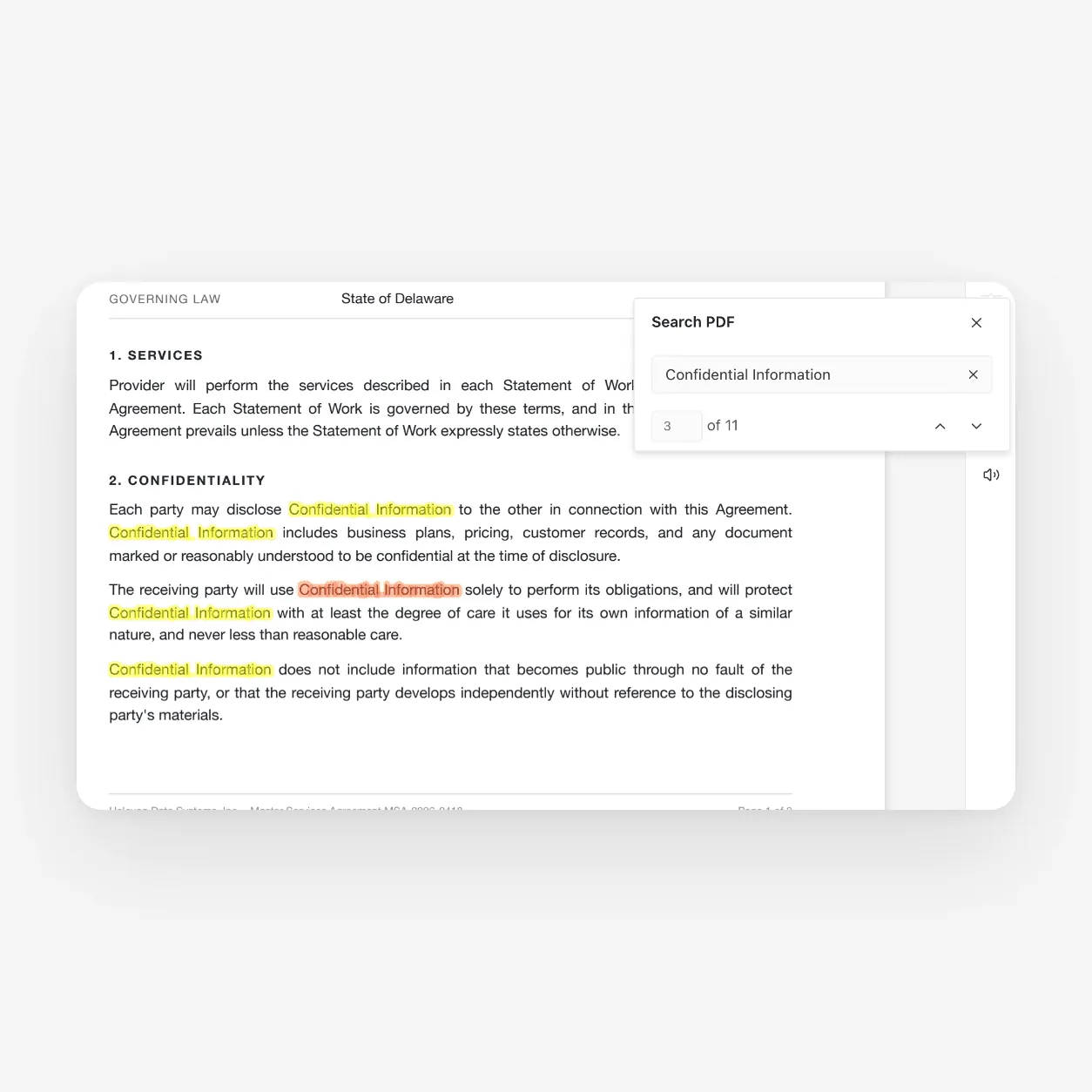
    Stirling PDF viewer showing a contract page with search results highlighted
    Fig. 5 — Stirling PDF viewer showing a contract page with search results highlighted
  6. Release:

    v3.2.0

    October Update

    New page editor and better password-protected PDFs

    A redesigned Page Editor replaces the multi-tool.

    • A redesigned Page Editor replaces the multi-tool, with image support and file renaming
    • Password-protected PDFs can be viewed and used with common tools without removing the password
    • Stirling Sign emails participants and requesters as a signing request progresses
    • Files can be dropped anywhere on the workbench
    • Compression reports when it could not shrink a file

    Release notes on GitHub

    Stirling PDF workbench with the file library, an open document and the tools list
    Fig. 6 — Stirling PDF workbench with the file library, an open document and the tools list
  7. Release:

    v3.1.0

    October Update

    Stirling Sign, Office Convert (beta) and text editor upgrades

    Stirling Sign leaves alpha. Office Convert is in beta.

    • Stirling Sign moves out of alpha and is on by default for new users
    • Stirling Office Convert is available as a beta
    • The text editor can edit tables
    • The text editor can edit OCRed image PDFs
    • Attachments can be added, renamed, extracted and deleted
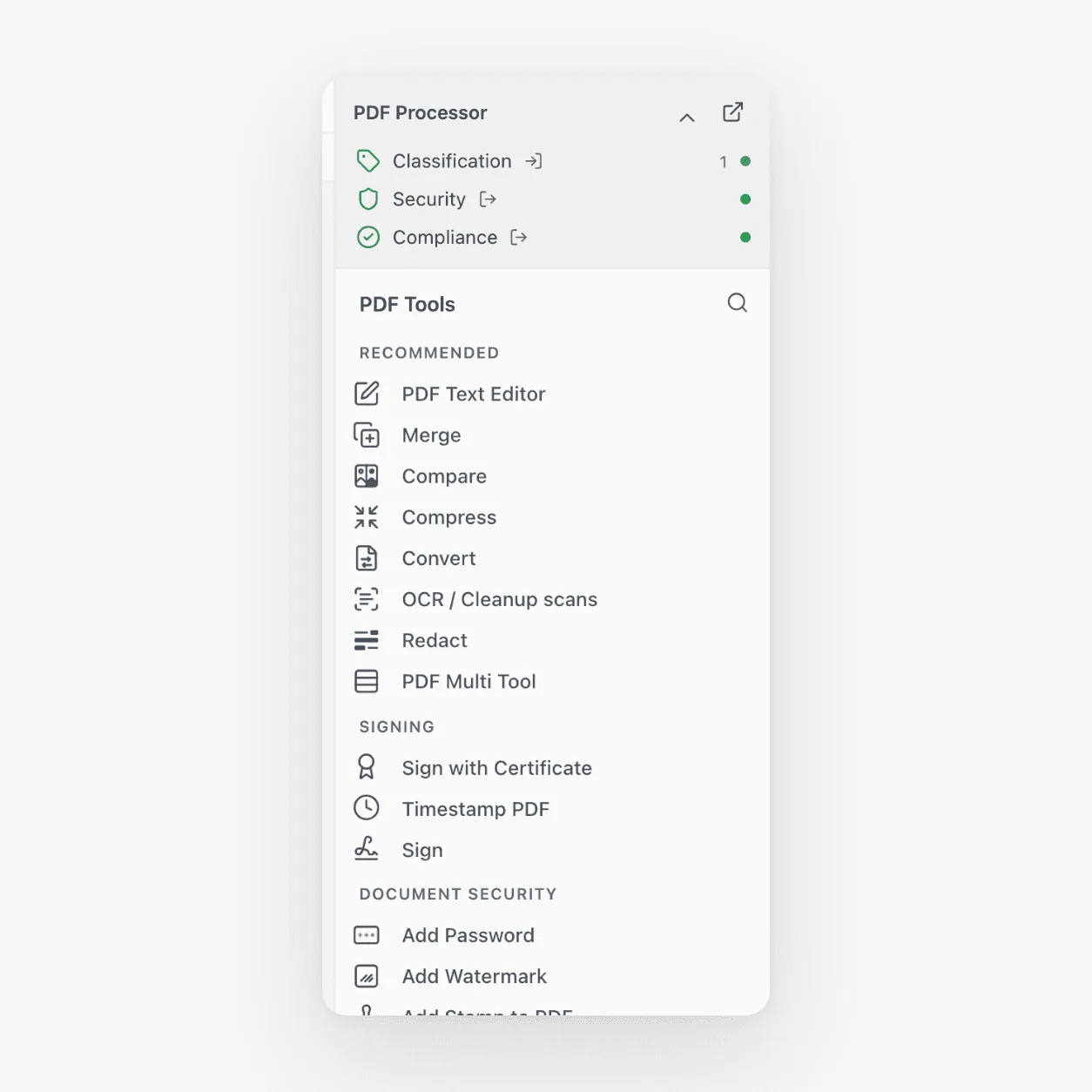
    Stirling PDF tools list showing PDF Text Editor, Convert and the signing tools
    Fig. 7 — Stirling PDF tools list showing PDF Text Editor, Convert and the signing tools
  8. Release:

    v3.0.2

    October Update

    Selective page cropping and bug fixes

    Selective page cropping, page reordering feedback and fixes.

    • Crop now supports selective page cropping
    • Visual feedback while reordering pages in the Page Editor
    • Better tool recommendations based on how you use tools
    • Fixed missing translations and languages that did not load correctly
    • Fixed file upload issues in the latest-fat image
    • Fixed the processor not loading in some versions and the default viewer mode not working

    Release notes on GitHub

  9. Release:

    v3.0.1

    September Update

    Windows desktop hotfixes

    Fixes for the double title bar and growing temp files on Windows desktop.

    • Fixed the double Windows title bar that appeared after upgrading the desktop app
    • Fixed temp log files growing over time, with the backend now stopping gracefully and cleaning up extraction folders
    • Unified icon colours in the tool list and viewer bar
    • Renamed the right sidebar header to PDF Tools

    Release notes on GitHub

  10. Release:

    v3.0.0

    September Update

    PDF Processor, new Text Editor and free OAuth SSO

    A new PDF Processor for bulk automation, a new Text Editor and free OAuth SSO.

    • New PDF Processor runs existing tools across many files from folders, FTP, S3 and other sources, and keeps listening for new files
    • Optional AI in Processor to understand, classify and extract data from documents, off by default and able to use self-hosted models
    • Automation includes 1,000 PDFs per month free, and linking your server to stirling.com adds 500 more plus hosted AI
    • OAuth SSO is now free for all users, and normal PDF Editor use stays free and unlimited
    • New Text Editor out of alpha, plus improved Form Editor, auto form detection, redaction improvements and PDF Portfolio support
    • New Files Library, Reader view, Settings page, QR code signing from a phone, RFC3161 timestamps and search across all tools

    Release notes on GitHub

  11. Release:

    v2.14.3

    August Update

    Bug fixes for tools, desktop and viewer

    A hotfix with many fixes across tools, the desktop app and the viewer.

    • Merge, split and other operations fixed on Debian 12 and Fedora 44
    • Fixed concurrent usage problems on tools like merge
    • Large 2GB PDFs no longer crash in certain scenarios
    • Automate fixes, including the remove images tool
    • Linux startup fixes and a Windows ARM64 test build for desktop
    • Known issues remain for Mac users, with another fix planned in the next few days

    Release notes on GitHub

  12. Release:

    v2.14.2

    July Update

    Hotfix for certain Postgres environments

    A server hotfix for Postgres connections that failed to load user data.

    • Fixes user data failing to load on certain Postgres connections
    • Server only fix, no other changes listed

    Release notes on GitHub

  13. Release:

    v2.14.1

    July Update

    Bug fixes and a third-party licenses page

    Hotfixes for signing and page rearranging, plus a licenses page.

    • New settings page listing licenses for frontend and backend third-party dependencies
    • Fixed certificate signing not showing for certain installations
    • Fixed a rearrange pages bug that caused the tool to fail
    • PostHog no longer loads before opt-in flags are read
    • Fixed tooltip positioning on Add Page Numbers
    • Fixed missing app icon on Linux and Wayland

    Release notes on GitHub

  14. Release:

    v2.14.0

    June Update

    Hardware token signing and shared signing

    Desktop hardware token signing and a login disclaimer.

    • Desktop token signing with USB or smart-card PKCS#11 and OS certificate stores (desktop only)
    • Shared signing and file sharing return to the top bar
    • Improved side menu for comments, annotations and attachments, with easier adding and clear all buttons
    • Optional login disclaimer for businesses that want it
    • Fixed desktop login issues, including a missing refresh token
    • Installer now has a logo and is named Stirling PDF instead of Stirling-PDF

    Release notes on GitHub

  15. Release:

    v2.13.2

    June Update

    Desktop performance and security fixes

    Security fixes, faster desktop UI and fewer Docker dependencies.

    • Security fixes and removal of unused dependencies in the Docker images
    • Removed ffmpeg from published Docker images
    • UI performance fix for desktop users
    • Update notices no longer appear where they should not
    • Fixes for the desktop app not running correctly on Mac and for some desktop build issues
    • Fixed the current user role display in the edit dialog and hid users already in the selected team

    Release notes on GitHub

  16. Release:

    v2.13.1

    June Update

    Fixes for multi-tool rotation and mobile upload

    Bug fixes for multi-tool rotation and desktop mobile upload.

    • Multi Tool page rotation is no longer lost on save
    • Desktop mobile upload via QR code scan now works, with a fixed LAN QR URL and a new mobile-upload page
    • Editor translations synced with pluralization support and new UI strings
    • Added a metric for the total number of PDFs processed

    Release notes on GitHub

  17. Release:

    v2.13.0

    June Update

    MCP page, US language and My Files updates

    An MCP page, Ctrl+A in the viewer and a refreshed My Files UI.

    • New MCP page, still a work in progress
    • Ctrl+A now selects all text in the PDF viewer
    • New US English language, now the default
    • Improved My Files UI and file deletion menus
    • Open Graph previews for web links
    • Fixed text selection on laptops and touchscreen devices

    Release notes on GitHub

  18. Release:

    v2.12.0

    June Update

    JDK 25, folder storage and faster merges

    JDK 25 is now required, with server folder storage and lower memory use.

    • Backup recommended before upgrading because of the size of this release
    • JDK 25 is now enforced for better memory efficiency and compatibility
    • Merge and split use far less memory, with up to 99% less on merges and splits
    • New folder system for file storage with a My Files UI, enabled in settings
    • Desktop multi-window support, plus a desktop auto updater that is still in progress
    • Fixes for font loss in Rearrange, Overlay, Auto-split and OCR, SSO auto-login, and desktop login loops

    Release notes on GitHub

  19. Release:

    v2.11.0

    May Update

    New file management UI preview

    A preview of a new layout with files on the left and tools on the right.

    • Preview of a new UI that puts files on the left and tools on the right, to ease file management and selection
    • Built in response to feedback about forced file management, and still a work in progress
    • Feedback is welcome on Discord
    • Split and delete forms
    • Fixes for the desktop app overscrolling and Task commands in PowerShell
    • Added translations

    Release notes on GitHub

  20. Release:

    v2.10.1

    May Update

    Unified Mac installer and desktop fixes

    One Mac installer for x86 and arm, plus desktop fixes.

    • Unified Mac installer: a single install works on both x86 and arm
    • Faster loading, with more improvements planned for the next update
    • Fixed desktop tools that did not work at all, such as Get info
    • Fixed the desktop file save and edit status not showing
    • Automate can now import and export configurations
    • Fixed a bug where participant session API responses leaked peer share tokens

    Release notes on GitHub

  21. Release:

    v2.10.0

    April Update

    New desktop packages, pixel compare and fixes

    AppImage and RPM desktop builds, a pixel compare mode and bug fixes.

    • New AppImage and RPM desktop builds, both new so bug reports are welcome
    • Desktop releases now support Homebrew, AUR, Scoop and winget
    • Pixel compare mode in the PDF Compare tool for formatting changes
    • Set a default startup view and reader zoom for desktop
    • Faster thumbnails and lower memory use for API calls
    • Fixes for SSO file sharing, the encrypted PDF modal, thumbnails and QR codes on desktop

    Release notes on GitHub

  22. Release:

    v2.9.2

    April Update

    Hotfix for folder scanning issues

    A hotfix that resolves folder scanning problems.

    • Fixes folder scanning issues in the pipeline

    Release notes on GitHub

  23. Release:

    v2.9.1

    April Update

    Docker permission fixes and file selection improvements

    Docker permission fixes and clearer file selection across tools.

    • Running a tool in the viewer now only runs it on the viewed file
    • Running a tool in active files still runs it on all selected files
    • Improved file selection in the compare and merge tools and others
    • Possible fix for file permission issues in Docker and thread timing issues
    • Fix for redaction drift caused by line separators

    Release notes on GitHub

  24. Release:

    v2.9.0

    April Update

    File sharing, group signing and viewer upgrades

    Alpha file sharing and group signing, plus viewer upgrades and fixes.

    • Server-side file sharing and group signing, both visual and certificate, as Alpha features that are off by default
    • Dark mode colour filters for PDFs in the viewer
    • Non-PDF files such as CSV, JSON, MD and PNG can now show in the viewer
    • Admins can unblock accounts locked by incorrect password attempts sooner
    • Fixes for QR code splitting, CPU usage, and Redact API and UI issues
    • Security fixes and removal of old dependencies, so updating is advised

    Release notes on GitHub

  25. Release:

    v2.8.0

    March Update

    Optional desktop login, comments and PDF timestamps

    Desktop no longer needs a login, plus comments and a timestamp tool.

    • Desktop no longer requires login; it is only needed for tools that cannot run locally, marked with a cloud icon
    • Comment support for viewing and adding comments, using your username automatically
    • New RFC 3161 PDF timestamp tool
    • Multi-page PDF layout has many more customisation options
    • Remove image endpoint is back, and PDF rendering is faster
    • Security patches, plus fixes for DOCX conversion on desktop, email invites and text selection

    Release notes on GitHub

  26. Release:

    v2.7.3

    March Update

    Read aloud, better annotations and Mac printing

    A read aloud mode in the viewer, plus annotation, printing and HTTP/2 fixes.

    • New read aloud feature in the viewer that speaks the PDF to you
    • Improved annotation handling in the annotation UI
    • Printing now works in the Mac desktop app
    • Fixed non-ASCII characters in headers being rejected
    • Fixed HTTP/2 support
    • Breaking: remove-image tool removed temporarily and folder watching changed, so users of these should wait for 2.8.0

    Release notes on GitHub

  27. Release:

    v2.7.2

    March Update

    Desktop self-hosted connection fix

    Fixes self-hosted connections in the desktop app.

    • Fixed self-hosted connections in the desktop app that stopped working because the instance was treated as non self-hosted
    • Credit insufficiency blocking now only applies to the SaaS version

    Release notes on GitHub

  28. Release:

    v2.7.1

    March Update

    Desktop and rotation bug fixes

    Fixes for desktop conversions, offline fallback and rotating large documents.

    • Desktop conversions no longer turn a save into a save as
    • Desktop falls back to the local backend when a self-hosted server is offline
    • Rotate now works correctly on large documents
    • Fixed the invalid 'open with PDF' description on Windows
    • PostHog cookie is limited to the Stirling PDF subdomain and no longer set when unused

    Release notes on GitHub

  29. Release:

    v2.7.0

    March Update

    Settings search, better auditing and desktop updates

    Searchable settings, improved auditing and desktop notifications.

    • New search bar to find settings quickly
    • Improved auditing with file hash and author options and better reporting
    • Enterprise users should back up their Stirling database before updating
    • Desktop app restores its previous window state and location on launch
    • Desktop app sends OS notifications when tasks finish while minimised
    • Google Drive and mobile upload can be hidden in My Files when disabled

    Release notes on GitHub

  30. Release:

    v2.6.0

    March Update

    Java 25 support and faster, lighter Stirling PDF

    Lower memory use, faster startup and smaller Docker images.

    • Breaking: JDK 17 is no longer supported, use JDK 21 to 25, with JDK 25 recommended for jar installs
    • About 30% lower idle memory use and faster startup in testing
    • Docker image size reduced by 30-40%
    • Desktop can optionally connect to the Stirling cloud server to run tools that are not installed, if logged in
    • Security patches and dependency updates
    • Fixed health check failing under certain auth setups and crop not working on desktop

    Release notes on GitHub

  31. Release:

    v2.5.3

    February Update

    XLSX conversion, page splitting and viewer shortcuts

    PDF to XLSX conversion, poster-style page splitting and viewer shortcuts.

    • New PDF to Excel (XLSX) conversion
    • Split a page into printable chunks, such as A3 into two A4 sheets for posters
    • CSV and XLSX extraction for form fields
    • Keyboard shortcuts in the viewer for print, save, undo and more
    • Viewer now loads the latest file when open, plus export and other viewer fixes
    • Cookie consent no longer reappears on desktop builds

    Release notes on GitHub

  32. Release:

    v2.5.2

    February Update

    Ruler and measure tool, plus security and desktop fixes

    A new ruler in the viewer, security improvements and desktop fixes.

    • Ruler and measure support in the viewer
    • Security improvements
    • Form writing fixed on the open-source version, with the package moved fully to OSS
    • Possible fix for Mac desktop issues, with a permissions plist file added
    • Desktop app is now detected as desktop more reliably and uses the correct publisher ID
    • License checks now retry on failure

    Release notes on GitHub

  33. Release:

    v2.5.1

    February Update

    Fixes for login, forms and desktop SSO

    Bug fixes for login, forms and desktop SSO.

    • Fixed the "something went wrong" error at login when the language list has one entry
    • Forms now display correctly and work on desktop
    • Fixed desktop SSO redirect race condition issues
    • Fixed a 431 error caused by large requests to endpoints

    Release notes on GitHub

  34. Release:

    v2.5.0

    February Update

    Form fill, redaction and session improvements

    Form filling, better redaction and annotation, and JWT session changes.

    • New FormFill tool for filling in PDF forms
    • Manual redaction now has colour selection and an improved UI
    • Attachment support with a sidebar button in the viewer
    • Add and remove links, with improved link handling and location
    • Extra JWT settings for desktop and browser expiry times, plus refreshing that avoids forced re-logins
    • Desktop edits opened files instead of creating new copies

    Release notes on GitHub

  35. Release:

    v2.4.6

    February Update

    Bug fixes for licensing, SSO and file size

    Fixes for licensing, public endpoints, language and SAML SSO on desktop.

    • License now loads correctly despite cache issues
    • Public endpoints are accessible without a JWT
    • Language correctly uses the server's default
    • Desktop SAML SSO fixes, plus SSO cleanups and extra logging
    • maxFileSize server setting is now handled correctly
    • Markdown conversion now supports images and zip output

    Release notes on GitHub

  36. Release:

    v2.4.5

    February Update

    Desktop headless install and strict PDF/A mode

    Headless Windows MSI install, desktop SSO changes and a strict PDF/A mode.

    • Windows desktop MSI supports headless installation with custom server URL and login mode parameters
    • STIRLING_LOCK_CONNECTION=1 limits the desktop app to the self-host server only, currently in testing
    • Desktop supports login method restrictions and remembers the last self-host URL
    • New strict mode for PDF/A conversion when a conversion is not perfect
    • Redaction improvements and better synonym search
    • SSO auto login mode now works correctly, with SSO UI changes and cleanups

    Release notes on GitHub

  37. Release:

    v2.4.4

    February Update

    Page editor fix and Bates stamping options

    A page editor hotfix plus Bates stamping zero padding.

    • Fixed a page editor bug that caused multi-page selection issues
    • Optional zero padding for page numbers in Bates stamping
    • Fixed an error in the extract bookmarks API
    • New CLI diagnostics command that collects logs into a zip for error reporting
    • Updated Italian translations and added missing compare and stamp label translations

    Release notes on GitHub

  38. Release:

    v2.4.3

    January Update

    Desktop fixes and watched folder improvements

    Many desktop fixes, plus multiple recursive watched folders.

    • Desktop and server versions are shown separately, with a warning on client-server mismatch
    • Watched folders can be recursive, and multiple directories can be defined
    • Fixed desktop login expiry and CORS issues
    • Better desktop connections to self-hosted servers, including self-signed certificate fixes
    • Page Editor performance and UI improvements
    • Fixed the frontend error screen appearing during SSO login

    Release notes on GitHub

  39. Release:

    v2.4.1

    January Update

    Desktop fixes and iframe support option

    Desktop HTTPS and Mac startup fixes, plus an iframe setting.

    • Fixed HTTPS connections in desktop mode
    • Fixed Mac desktop app not starting correctly
    • New Xframe option in settings.yml and the options menu for iframe support
    • Possible login fixes
    • Various other bug fixes

    Release notes on GitHub

  40. Release:

    v2.4.2

    January Update

    Stamp variables, audit and tool fixes

    Stamp PDF gets dynamic variables, plus audit and tool fixes.

    • New variables and templates for Stamp PDF text
    • Fixed Audit and Usage Analytics sections failing in some scenarios
    • Tools are now correctly disabled through disable-endpoints settings
    • Text editor font rendering fixes
    • Fixed opening files in the PDF Text Editor

    Release notes on GitHub

  41. Release:

    v2.4.0

    January Update

    2FA support, database backups and PDF/X

    Two-factor login, H2 backup management and PDF/X conversion.

    • Full 2FA support with one-time-password authenticator apps
    • Database backup and restore management in the admin UI, for internal H2 database users only
    • PDF/X conversion option
    • Get info on PDF now supports compliance verification
    • Automation tool can export folder scan JSONs for folder automation
    • Bug fixes for the Sign tool, SSO user creation and date and time placeholders in text stamps

    Release notes on GitHub

  42. Release:

    v2.3.1

    January Update

    SVG to PDF conversion and UI fixes

    SVG to PDF conversion, OCR language management and several UI fixes.

    • New SVG to PDF conversion
    • Admins can manage tessdata languages for OCR, including downloads
    • Fixed the scroll bar in the settings menu
    • Fixed Automate menus so options show correctly
    • Improved parameter handling and defaults in automation, with a fix for errors in many-to-one tools
    • Improved file processing in pipelines, and fixed a bad multipart request issue

    Release notes on GitHub

  43. Release:

    v2.3.0

    January Update

    Telegram bot, EPUB export and conversion fixes

    A Telegram bot, PDF to EPUB and AZW3, and MSG support.

    • Telegram bot integration, available in the Connections menu or settings.yml
    • PDF to EPUB and AZW3 conversion
    • MSG file support for email conversion
    • Fixed file conversion threading
    • Fixed incorrect processing of files with non-roman alphabets
    • Desktop app bug fixes, with more fixes coming

    Release notes on GitHub

  44. Release:

    v2.2.1

    January Update

    Mobile QR options and desktop connection fixes

    Mobile QR scanner options and a possible fix for desktop connections.

    • Mobile QR scanner custom options, found under connections in the settings menu
    • Possible fix for self-hosted connection issues from the desktop app
    • Added logging for desktop self-hosted connections
    • Fix for custom OCR languages
    • Login options are hidden when their login type is disabled
    • PDF/A verification now detects non-PDF/A documents that have XMP metadata

    Release notes on GitHub

  45. Release:

    v2.2.0

    January Update

    Ebook conversion, redaction, mobile scan and desktop SSO

    Ebook conversions, manual redaction, mobile scan and desktop SSO.

    • Ebook conversions to and from PDF, including EPUB, MOBI, AZW3, FB2 and CBR
    • Manual redaction
    • New PDF/A compliance options such as PDF/A-3B, with better conversion quality and color accuracy
    • Mobile scan with edge detection and deskewing: scan a QR code and upload photos from your phone, enabled in connection settings
    • Desktop app supports SSO logins for self-hosted users
    • Auto background removal for signatures and an auto crop mode that detects file borders

    Release notes on GitHub

  46. Release:

    v2.1.5

    December Update

    Annotations, SAML fixes and static file overrides

    Annotation updates, SAML fixes and custom static file overrides.

    • Annotation improvements in the viewer
    • SAML bug fixes
    • Static file overrides are back for custom files
    • Sign up is now available in the desktop app
    • Dual page view is only offered when a PDF has more than one page

    Release notes on GitHub

  47. Release:

    v2.1.4

    December Update

    Line art conversion and bug fixes

    Line art conversion in Compress and fixes for SAML and the viewer.

    • Line art conversion in the Compress tool turns images into black and white line art for further compression
    • Fixed SAML not working for certain installations
    • Fixed the PDF Viewer failing due to wasm loading issues
    • Fixed a cache not found exception in the PDF Text editor
    • Account change UI, which was missed in the last update
    • Shorter onboarding, with more changes to come

    Release notes on GitHub

  48. Release:

    v2.1.3

    December Update

    SSO login page and desktop bug fixes

    A hotfix for SSO login pages and several other bugs.

    • Fixed SSO login pages not displaying correctly
    • Fixed cache clearing issues
    • Desktop installs now show the correct app version
    • Mac app can now open files with spaces in their name
    • PDF viewer works in airgapped setups and no longer downloads pdfium on load
    • Improved quick access bar styling and fixed tab tooltips

    Release notes on GitHub

  49. Release:

    v2.1.2

    December Update

    Password change UI and SMTP SSL fixes

    Users and admins can change passwords, and SMTP now works under SSL.

    • Change password and username UI added for users
    • Admins can change user passwords
    • SMTP now works under SSL, with new settings.yml entries for advanced customisation
    • Extra font support in the text editor
    • Possible fix for Swagger access issues when login is enabled
    • Admin UI no longer shows for regular users

    Release notes on GitHub

  50. Release:

    v2.1.1

    December Update

    SSO login fix and desktop login update

    A hotfix with a possible SSO fix and a matching desktop login screen.

    • Possible fix for SSO login issues seen since the 2.0 update
    • Desktop login screen now matches the standard login screens
    • More fixes for Automate
    • Updated OCR setup guide link in the language picker
    • SERVER added to the list of valid license types
    • General UI tweaks and bug fixes

    Release notes on GitHub

  51. Release:

    v2.1.0

    December Update

    Open-source PDF text editor and SSO changes

    The PDF text editor is now open source, in alpha.

    • Open-source PDF text editor to edit existing text and add or move images, in alpha with known quirks
    • Text editor has single line and paragraph modes
    • General SSO moved from the enterprise plan to the SERVER plan
    • New feature to get all info on a PDF
    • Fixed Convert to/from PDF erroring on multiple files
    • Fixed SSO buttons not showing or linking correctly

    Release notes on GitHub

  52. Release:

    v2.0.3

    December Update

    Login, SSO and file handling bug fixes

    Fixes for SSO login, large files, signatures, Automate and forms.

    • Fixed SSO login issues
    • Fixed problems with files over 100MB
    • Fixed signature saving
    • Fixed Automate not working when a user is logged in
    • Forms are now visible in the viewer
    • The MODE feature is temporarily removed from the Docker image and will return in a later update

    Release notes on GitHub

  53. Release:

    v2.0.2

    November Update

    Saved signatures and many bug fixes

    Signatures can now be saved, plus fixes for the viewer, OCR, Swagger and Desktop.

    • Save signatures to the server when login is enabled, or to browser storage when it is disabled
    • Links now show and work in the PDF viewer
    • OCR tool now shows languages correctly
    • SMTP without authentication now works
    • Swagger access issues resolved
    • Desktop fixes for self-hosted server connections and loading

    Release notes on GitHub

  54. Release:

    v2.0.1

    November Update

    Hotfix for desktop app and web UI issues

    A hotfix for desktop connection problems, dark mode styling and jar packaging.

    • Frontend code is included in the main jar again, so a single jar can be hosted as before
    • New Server.jar for running without the bundled frontend code
    • Desktop installer fixes for CORS, connections, loading and refreshing
    • Fixed a login loop on self-hosted desktop
    • Dark mode styling fixes for some UI components
    • Fixed UI prompts and cookie banner showing in the wrong order

    Release notes on GitHub

  55. Release:

    v1.6.0

    November Update

    eBook, video and PDF/A-3 conversions, final V1 release

    New conversion tools and a Debian-based Docker image.

    • Breaking change: Docker images move from Alpine to Debian, so check custom setups before upgrading
    • New PDF to Video slideshow conversion with MP4 and WebM output
    • New eBook to PDF conversion for EPUB, MOBI, AZW3, FB2, TXT and DOCX
    • New PDF to EPUB and AZW3 conversion
    • Support for PDF/A-3b and PDF/X formats, with improved PDF/A conversion
    • Advanced compression parameters, better optimization levels and a linearize PDF option

    Release notes on GitHub

  56. Release:

    v2.0.0

    November Update

    Stirling PDF V2 with redesigned UI and desktop apps

    A full redesign with native desktop apps, file version history and new licensing.

    • Brand new, faster UI that makes it easier to switch between tools
    • Files move between operations, so one upload supports multiple tools without reuploading
    • Undo, redo and full version history for all changed files
    • Native desktop apps with full "open with" support
    • Split deployments with a separate frontend and backend, plus desktop to server linkage for a hybrid setup
    • Admins can change all system settings from the UI instead of server config files

    Release notes on GitHub

  57. Release:

    v1.5.0

    October Update

    Analytics rework, PDF to Vector and attachments

    Unified opt-in analytics, PDF to Vector conversion and attachment extraction.

    • Analytics are opt-in and now use one parameter, easier to disable in settings.yml and the consent banner, covering PostHog and Scarf
    • New PDF to Vector image conversion
    • New Extract Attachments tool that exports embedded files as a ZIP
    • Enhanced PDF info with a clearer UI and more details on attachments, images and forms
    • Flatten PDF can now be set to a custom rendering DPI
    • Fixed oversized output files in multi-tool and Extract Pages, plus security hardening

    Release notes on GitHub

  58. Release:

    v1.4.0

    October Update

    CBZ and CBR conversion and crop improvements

    New comic format converters and a crop option to remove outside text.

    • CBZ to PDF and PDF to CBZ conversion
    • PDF to CBR conversion, which requires manually installing rar due to license requirements
    • Crop can remove text outside the crop window
    • Extra colour options in the Sign and Replace colours tools
    • Get info now checks PDF compliancy correctly
    • Fixed merge ordering by time

    Release notes on GitHub

  59. Release:

    v1.3.1

    September Update

    Quick fixes and translation updates

    Fixes missing translations and a minor build issue.

    • Missing translations added and synced
    • Fixed a missing import in the split PDF by sections tool that caused a build issue

    Release notes on GitHub

  60. Release:

    v1.3.2

    September Update

    Login bug fix for older accounts

    Fixes a login bug from 1.3.0 affecting older accounts.

    • Fixed a login bug introduced in 1.3.0 for users with login accounts older than 14 months

    Release notes on GitHub

  61. Release:

    v1.3.0

    September Update

    Advanced redaction and security improvements

    Auto redact removes text directly, plus new page number and signing options.

    • Auto redact can remove text from PDFs without converting pages to images
    • PDF to Image can show annotations and highlights
    • Font color option for page numbers
    • PFX alias for PKCS12 certificates, with .crt, .cer and .der certs and .key keys accepted
    • Split PDF uses better file number padding
    • New Audit API with export, stats and cleanup endpoints, and a configurable database backup schedule

    Release notes on GitHub

  62. Release:

    v1.2.0

    August Update

    PSD support, bookmark import and export, and fixes

    Image to PDF now accepts PSD files, plus bookmark import and export.

    • Image to PDF supports Photoshop PSD files
    • Table of contents bookmarks can be imported and exported through the clipboard
    • Update notice shows urgency when newer versions include security patches, and links to the right download
    • New configurable maxDPI limit for PDF to image conversion
    • Fixes for pipeline operations that use slashes in values and for the Stamp tool image filename check
    • SAML fix for IdP metadata loading and a missing private key

    Release notes on GitHub

  63. Release:

    v1.1.1

    July Update

    Pipeline fixes and other bug fixes

    Small fixes for pipelines and unexpected errors.

    • Corrected pipeline paths and added extraction of the default Web UI pipeline config
    • Fixed an error in the search dropdown when hiding it
    • Removed file locks
    • Settings API added to V1
    • Docker ultra lite fix
    • Updated Traditional Chinese (zh_TW) translation and language names

    Release notes on GitHub

  64. Release:

    v1.1.0

    July Update

    Security updates and UI bug fixes

    Security hardening, a fixed auth.log and several UI fixes.

    • HTML sanitisation now strips external image requests from img tags, on by default and can be disabled in settings.yml
    • Various extra security changes and patches
    • Auth.log now generates correctly
    • Cookie banner no longer shows when cookies are disabled
    • UI scaling and Navbar fixes, including mobile devices and the search scroll bar
    • Multi-tool is usable when zoomed in or in a narrow browser window

    Release notes on GitHub

  65. Release:

    v1.0.2

    July Update

    Minor bug fixes for resources and account button

    Fixes for resource overrides, the account button and API docs.

    • Fixed resource overrides not being applied correctly
    • Fixed the account button not being visible in some cases
    • API docs now update correctly
    • Survey now prompts users less often

    Release notes on GitHub

  66. Release:

    v1.0.0

    July Update

    EML to PDF, table of contents editing and attachments

    New PDF tools, restored OCRMyPDF and Ghostscript, and Pro audit logs and teams.

    • New EML (email) to PDF conversion
    • Table of Contents editing and a tool to add file attachments to PDFs
    • Fake Scan page feature makes a PDF look scanned (work in progress, may be removed)
    • OCR and compression use OCRMyPDF and Ghostscript again for advanced PDF operations
    • Temporary file manager clears files even after crashes
    • Pro: audit logs and team management. Back up your /configs folder before testing

    Release notes on GitHub

  67. Release:

    v1.0.1

    July Update

    Fix for security jar download in Docker

    A Docker fix for security jar downloads caused by a changed flag.

    • Docker: both DOCKER_ENABLE_SECURITY=true and DISABLE_ADDITIONAL_FEATURES=false now work, for compatibility with older configs
    • Fixes security jar download failures on the latest tag when DISABLE_ADDITIONAL_FEATURES=false was not set
    • Users of the account system are advised to use the latest-fat tag
    • Third party licenses updated

    Release notes on GitHub

  68. Release:

    v0.46.2

    May Update

    Legacy homepage removed and Malayalam added

    The legacy homepage is gone and Pro licenses can float between machines.

    • Legacy homepage removed in favor of the new homepage
    • Malayalam language added
    • Pro and Enterprise licenses can float between machines
    • Fixes for the redact script path, user settings updates, template resolution and the LibreOffice listener
    • Improved type safety and OpenAPI schema for PDF API controllers
    • Updated Spanish and Traditional Chinese translations

    Release notes on GitHub

  69. Release:

    v0.46.1

    May Update

    Email API, home page scaling and bug fixes

    An Email API, a better small-screen home page and several fixes.

    • New Email API for sending email with attachments from Stirling PDF, still a work in progress with no dedicated integrations
    • Home page scales better on small screens so features are easier to see
    • Compression is more aggressive at higher levels
    • Fixed errors in color replacement and in cert-sign when no page number is given for invisible signatures
    • Fixed a redact color issue
    • Language list now shows native names, plus various translation updates

    Release notes on GitHub

  70. Release:

    v0.46.0

    April Update

    Unlock PDF forms and bug fixes

    A new tool to unlock read-only PDF forms, plus several fixes.

    • New Unlock PDF Forms tool removes read-only locks from forms
    • Fixed a CRLF sequence neutralization issue in HTTP headers flagged by Snyk
    • Fixed the multi tool select buttons
    • Footer in the PDF viewer adapts better to page size
    • Signed rotated documents now match the preview
    • File extension checks in the pipeline are now case-insensitive

    Release notes on GitHub

  71. Release:

    v0.45.6

    April Update

    Fixes for pipelines and signature drawing

    Pipelines load correctly again and signature drawing no longer lags.

    • Fixed pipelines not loading correctly, a bug introduced in 0.45.5
    • Fixed signature drawing lagging on certain devices, including Firefox on mobile
    • Reduced errors found through analytics
    • Updated Italian translation

    Release notes on GitHub

  72. Release:

    v0.45.5

    April Update

    Upload limit display and language updates

    Servers can now show their file upload limit.

    • New fileUploadLimit setting in settings.yml shows the server's file upload limit to users
    • Language updates, including a completed Traditional Chinese (zh_TW) translation and an Italian update
    • Fix for the macOS x86_64 installer
    • Non-certificate files can now be used as enterprise files

    Release notes on GitHub

  73. Release:

    v0.45.4

    April Update

    Language selection fixes and minor changes

    Fixes for language selection and a few small changes.

    • Fixed empty spaces shown when language suppression is used
    • Removed the CDN import for the cookie consent library
    • Mac x86_64 installer fix
    • Updated Italian translation

    Release notes on GitHub

  74. Release:

    v0.45.2

    April Update

    Hotfix for translations and Multi-tool UI

    A hotfix that restores translation files and improves the Multi-tool.

    • Translation files are now included in the release
    • Improved Multi-tool UI, with a fix for a reported UI issue
    • Internal API user is no longer counted in the total user count
    • Pipeline no longer shows disabled endpoints
    • Docker fix for the path to version.properties

    Release notes on GitHub

  75. Release:

    v0.45.1

    April Update

    New Mac installer, Google Drive and cookie banner

    A Mac installer for Intel machines and Google Drive support for Pro users.

    • New Mac installer for 64-bit non-Arm machines
    • Google Drive file picker support for Pro users
    • Cookie banner for further GDPR compliance
    • Get Info on PDF is now read-only when a PDF loads
    • Fix for potential unoserver startup issues
    • Sanitize PDF improvements and updated translations

    Release notes on GitHub

  76. Release:

    v0.45.3

    April Update

    Manual redaction defaults and installer fixes

    Manual redaction now defaults to text-based mode.

    • Manual redaction uses text-based redaction by default
    • Fixed the MacOS x86_64 installer
    • Fixed the releases link in the footer
    • Removed HTML tags from cookie banner text
    • Fixed an error when analytics is disabled

    Release notes on GitHub

  77. Release:

    v0.45.0

    March Update

    Security fixes and Premium licensing updates

    A security fix for all users, with URL-TO-PDF now off by default.

    • Major security fix, recommended for all users
    • URL-TO-PDF is disabled by default and must be enabled in settings.yml
    • Custom Java options can be set with the JAVA_CUSTOM_OPTS environment variable
    • Merge uses less memory and Split PDF logs are quieter
    • Fixed adding images in the view/edit PDF page and image scaling in the viewer
    • Premium: Prometheus support, offline licenses for air-gapped setups, a usage analytics page, and settings renamed from enterprise to Premium

    Release notes on GitHub

  78. Release:

    v0.44.3

    March Update

    Multitool UI updates and compression fixes

    Multitool gets the new file input box, plus OCR and compression improvements.

    • Multitool now uses the new file input box, with some UI cleanups
    • More OCR languages included in base images for a better out of the box setup
    • Compression fixes, and compression now works on Ultra-lite and the Windows exe version
    • Context path and file path handling fixes
    • Search UI and icon fixes, and Pipeline UI fixes
    • Language updates, including a new German translation

    Release notes on GitHub

  79. Release:

    v0.44.2

    March Update

    Compression fixes and signature undo and redo

    Compress PDF fixes and undo and redo when drawing signatures.

    • Hotfixes and further fixes for Compress PDF
    • Undo and redo when drawing a signature
    • Rotation angle is now validated
    • Adds unoserver and other enhancements
    • A tracking pixel is included, with no personal info and GDPR compliant
    • Improved Ukrainian and Italian translations

    Release notes on GitHub

  80. Release:

    v0.44.1

    March Update

    Zip support and a fix for leftover files

    Zip files are auto-extracted in the browser, and a leftover files bug is fixed.

    • Zip file support in the browser, which auto-extracts the files a tool needs
    • Fix for some files staying on the server after the transition (0.44.0 only)
    • Further memory usage improvements by removing getByte loads
    • New SSO claim attributes mail and uid
    • Docker users should switch to docker.stirlingpdf.com/stirlingtools/stirling-pdf, for example image: docker.stirlingpdf.com/stirlingtools/stirling-pdf:latest-fat
    • Translation updates for Traditional Chinese, German and Catalan

    Release notes on GitHub

  81. Release:

    v0.44.0

    March Update

    Memory improvements, highlighter and Docker URL change

    Lower memory use on large PDFs and a new highlighter tool.

    • Large memory usage improvements when reading PDFs over 50MB and in various other tools
    • New highlighter tool in the PDF viewer
    • New PDF decompress API
    • Another possible fix for the desktop client getting stuck at 90% on Windows
    • Please move your Docker image to docker.stirlingpdf.com/stirlingtools/stirling-pdf, for example docker.stirlingpdf.com/stirlingtools/stirling-pdf:latest-fat
    • Fixes for the error banner after upload, image resizing in the viewer and multitool undo deleting uploads

    Release notes on GitHub

  82. Release:

    v0.43.2

    March Update

    Compression fixes and HTML form support

    HTML to PDF keeps web forms, plus compression fixes.

    • HTML to PDF now converts web forms into PDF forms
    • PDF compression fixes
    • Improved search for wider matches
    • Survey prompt now has an option to book a meeting with the team

    Release notes on GitHub

  83. Release:

    v0.43.1

    February Update

    SSO bug fix for OAuth 2 redirects

    A quick hotfix for OAuth 2 sign-in.

    • Fixed the OAuth 2 redirectUri handling for SSO
    • Removed the book entry as a minor change

    Release notes on GitHub

  84. Release:

    v0.43.0

    February Update

    Grayscale compression, dynamic tool paths and SSO changes

    Grayscale compression, configurable tool paths and backend SSO changes.

    • Backend changes to SSO and configs, so report any issues
    • Compression can now convert images to grayscale
    • Dynamic paths for unoconvert and weasyprint in settings.yml
    • Local UI checks if port 8080 is in use and tries 8081 and up
    • Language bar has a new UI
    • Fixed the analytics prompt not showing on first launch

    Release notes on GitHub

  85. Release:

    v0.42.0

    February Update

    Windows install fix and new conversion service

    Fixes the Windows install stall and switches document conversion to unoserver.

    • Fixed the Windows install getting stuck at 90%
    • Document conversion now uses unoserver instead of unoconv, so please report any conversion issues
    • Bug fixes, including PDF compression errors and file overwrite issues
    • Fixed a crash with full invert and text overflow in entries
    • Security and dependency updates
    • New Docker Alpine version

    Release notes on GitHub

  86. Release:

    v0.41.0

    February Update

    PDF/A conversion returns with many bug fixes

    PDF/A conversion is back, along with many bug fixes.

    • PDF/A conversion is available again
    • Homepage fixes, including a tab issue
    • Fix for broken ZIP output
    • Pipeline and auto split fixes, with new documentation
    • Bug fixes for sign and add-image
    • Updated Brazilian Portuguese translation

    Release notes on GitHub

  87. Release:

    v0.40.2

    February Update

    Bug fixes for compression and Pipeline

    Fixes for compression, Pipeline and the UI, plus language options.

    • Compression no longer fails when qpdf exits with code 3, which is now treated as success with warnings
    • Pipeline fixes for runs that use OCR or HTML
    • Firefox compatibility fix and missing icons added to feature pages
    • Fixed a wrong link on the image to PDF tool and the tooltip title attribute
    • Configurable UI language support with dynamic filtering
    • Translation support for the Sort by label on the home page

    Release notes on GitHub

  88. Release:

    v0.40.0

    January Update

    Brand new homepage and split fix

    A redesigned homepage, with the old one kept alongside for now.

    • Brand new homepage, with the old homepage kept in parallel while feedback is collected
    • The old homepage will be removed based on user feedback
    • Fix for PDF split ranges with a missing end page
    • Config rework
    • Analytics logging now goes to the log file
    • Updated translations for Japanese, Irish, Brazilian Portuguese and Italian

    Release notes on GitHub

  89. Release:

    v0.40.1

    January Update

    Homepage and Sign fixes, HTML sanitization option

    Bug fixes for the homepage and PDF Sign, plus an HTML sanitization option.

    • Fixes for the homepage interface
    • Fixes for PDF Sign
    • Fixed a tab container logic bug
    • New option to disable HTML sanitization in HTML to PDF for some advanced HTML documents

    Release notes on GitHub

  90. Release:

    v0.39.0

    January Update

    Memory cleanup and new analysis APIs

    Lower memory use after operations and new page analysis endpoints.

    • Garbage collection cleanup improves memory usage after operations
    • New API endpoint /api/v1/analysis/page-count for scripts
    • New API endpoint /api/v1/analysis/page-dimensions for scripts
    • Fix for a possible NullPointerException
    • Updated Czech and French translations

    Release notes on GitHub

  91. Release:

    v0.38.0

    January Update

    PDF to Markdown and other improvements

    A new PDF to Markdown conversion and several fixes.

    • New PDF to Markdown conversion
    • Fixed identical fonts being displayed in the Sign PDF tool
    • Fixed tooltips on the redaction buttons
    • Updated translations, including Italian, German, Traditional Chinese and Korean

    Release notes on GitHub

  92. Release:

    v0.37.1

    January Update

    PDF compression fixes and translation updates

    Fixes for PDF compression and image-to-PDF URLs.

    • Fixed PDF compression sizing
    • Fixed image-to-PDF URL issues on the homepage
    • Added descriptions for compression optimization levels 6 to 9
    • Improved Portuguese, Hindi, Greek, German and Russian translations
    • Possible fix for the desktop UIs

    Release notes on GitHub

  93. Release:

    v0.37.0

    January Update

    Manual redaction and enterprise features

    Manual redaction, external database support and SSO auto-login.

    • New Manual Redaction tool with text selection, box drawing and other redaction options
    • External database support for Postgres, which also enables multiple load-balanced installs
    • SSO auto-login for enterprise users
    • PDF to image now supports custom page numbers
    • CSRF fixes and various security improvements
    • Tibetan language added and UI cleanups

    Release notes on GitHub

  94. Release:

    v0.36.6

    January Update

    Better signatures and drag-and-drop fixes

    Improved signatures, a drag-and-drop fix and signed Docker images.

    • Improved signature element
    • Fixed file drag and drop
    • Docker images are now signed for easy verification
    • Fixed SSO login rejection
    • Updated Traditional Chinese, French and German translations
    • Standardized the submit button

    Release notes on GitHub

  95. Release:

    v0.36.5

    December Update

    Image to PDF fixes and other improvements

    Image to PDF fixes and a batch of smaller bug fixes.

    • Image to PDF bug fixes, and the tool is back in the navbar
    • Images are drawn at the original PDF page dimensions
    • Fixed form data not being sent in multi-file requests
    • Fixed several tools that were missing PDFLib
    • Sensitive fields are excluded from SAML2 configuration string output
    • Added a config mount check

    Release notes on GitHub

  96. Release:

    v0.36.4

    December Update

    More merge and drag and drop fixes

    More fixes for merging PDFs and drag and drop.

    • Fixed image to PDF conversion type when merging
    • Fixed drag and drop bugs and cleaned up the UI
    • Fixed an error caused by a null draggable element
    • Renamed the LANGS variable in init.sh so it no longer clashes with the LANGS environment variable
    • Updated German translations

    Release notes on GitHub

  97. Release:

    v0.36.3

    December Update

    Merge PDFs bug fix

    A fix for a bug in the merge PDFs tool.

    • Fixed a bug in the merge PDFs tool

    Release notes on GitHub

  98. Release:

    v0.36.2

    December Update

    CSRF fixes

    A bug fix release with CSRF fixes.

    • Fixes for CSRF handling

    Release notes on GitHub

  99. Release:

    v0.36.1

    December Update

    Auto decryption, new exe versions and fixes

    Encrypted PDFs are now decrypted automatically, plus new exe builds.

    • Encrypted PDFs are decrypted automatically in nearly all features of the UI
    • New exe versions: Stirling-PDF-Server for console hosting and Stirling-PDF as a portable exe with UI
    • Stirling-PDF-Installer did not upload this release and will arrive next release
    • Text color selection for watermarks
    • Security fix for Server-Side Request Forgery
    • X-API-key header renamed to X-API-KEY for consistency

    Release notes on GitHub

  100. Release:

    v0.36.0

    December Update

    PDF certificate validation and bug fixes

    New PDF certificate validation plus fixes for file inputs and submit buttons.

    • New PDF certificate validation checks validity against the Mozilla CA list or a custom certificate
    • Certificate details include expiry time, type and issuer
    • Undo page break feature
    • Permissions are shown in a separate tab
    • Fixed a missing upload button and bugs with file inputs and submit buttons
    • Signing with a certificate now downloads only one file

    Release notes on GitHub

  101. Release:

    v0.35.1

    December Update

    File input improvements and bug fixes

    Improved file input menu and fixes for crop, stamp and metadata.

    • Updated file input menu with separate drag and drop areas for each file chooser
    • Only one file can be dropped onto a single file input
    • Fixed file input adding event listeners more than once
    • Fixed the submit button in Crop
    • Stamp tool now supports line breaks in text
    • Fixed a deserialization failure in Change Metadata

    Release notes on GitHub

  102. Release:

    v0.35.0

    November Update

    Multi-tool undo and redo, changes to OCR

    Multi-tool gains undo and redo, and the OCR tool has fewer features.

    • Multi-tool now supports undo (Ctrl+Z) and redo (Ctrl+Y)
    • OCR tool replaced and lacks some previous features, still uses Tesseract so no config changes needed
    • Security fix for arbitrary file access during archive extraction (Zip Slip)
    • Fixed page break insertion in Multi Tool
    • Fixed input file overwrite in merge
    • Added Azerbaijani translation

    Release notes on GitHub

  103. Release:

    v0.34.0

    November Update

    Better PDF to CSV and multi-page signing

    Improved PDF to CSV, multi-select in the multi-tool and signing on many pages.

    • PDF to CSV is heavily upgraded using Tabula and should give much better table results
    • Multi-tool supports multi-selected drag and drop to move pages
    • Sign can place the same signature on multiple pages at once
    • UI cleanups and new tooltips for the multi-tool and Sign
    • Bug fixes for search results in the homepage menus and file clearing after errors
    • Breaking database change: if updating from a version older than 0.28.0, first update to a version after 0.28.0 and restart, then update to 0.34.0+

    Release notes on GitHub

  104. Release:

    v0.33.1

    November Update

    Docker image moves to stirlingtools/stirling-pdf

    The Docker image has a new name, plus two bug fixes.

    • Docker image moves from frooodle/s-pdf to stirlingtools/stirling-pdf, so please switch to the new image
    • GitHub image is renamed to the full stirling-pdf name instead of the shorthand
    • Releases go to both old and new locations for now to allow migration time, with a switch coming later
    • Fixed Add Image making random changes to the image
    • Fixed PDF to CSV conversion

    Release notes on GitHub

  105. Release:

    v0.33.0

    November Update

    Multi-tool multi-selection and bug fixes

    Multi-tool now supports selecting multiple pages for rotate, delete and extract.

    • Multi-tool supports multi-selection by checkbox or page ranges like 1-10,12
    • Advanced rotate, delete and extract operations in Multi-tool
    • Watermarks now fill the whole page
    • Markdown to PDF conversion only accepts .md files
    • File inputs are cleared after jobs finish
    • Fixes for canvas crop, View PDF opener, username reading by login method and split by chapters checkbox

    Release notes on GitHub

  106. Release:

    v0.32.0

    November Update

    Blank page option in Multi-tool and bug fixes

    Multi-tool can insert blank pages, and Windows .exe installs can use CLI tools.

    • Multi-tool can insert a blank page between pages
    • Windows .exe installs now detect installed CLI programs instead of blocking them
    • Executor instance limits can be set from properties
    • Input sanitization added to fix a self-XSS issue
    • Sign PDF with certificate fixes the signature logo not loading, with an option to disable it
    • Fixes for navbar overlap and overflow, the missing favorite icon, remember me and auto language detection

    Release notes on GitHub

  107. Release:

    v0.31.1

    October Update

    Compress PDF bug fix

    A bug fix for the Compress PDF tool.

    • Fixed a bug in the Compress PDF page
    • Updated Italian translation

    Release notes on GitHub

  108. Release:

    v0.31.0

    October Update

    Saved signatures, faster Compare and visual signing

    Reusable signature images, faster Compare and visual certificate signing.

    • Sign can reuse saved images
    • Faster Compare tool
    • Visual certificate signing
    • Improved SAML2 integration with better certificate and error handling
    • Features that need external dependencies such as LibreOffice are enabled or disabled automatically
    • Image to PDF now applies image orientation from EXIF data

    Release notes on GitHub

  109. Release:

    v0.30.1

    October Update

    Minor bug fixes for prompts and multi-tool

    Fixes for the analytics prompt, startup survey and multi-tool scrolling.

    • Analytics prompt now closes after you choose an answer, without needing a restart
    • Survey no longer opens on startup and only appears after 5 home-page views
    • Removed horizontal scroll logic from the multi-tool template
    • Pro badge now removes correctly
    • French translation improvements

    Release notes on GitHub

  110. Release:

    v0.30.0

    October Update

    New home page, analytics opt-in and fixes

    A category-based home page, new merge page counts and many fixes.

    • New category-based home menu and other home page improvements
    • Page counts added to the merge tool
    • Option to use the next available port when the default is taken
    • Opt-in user analytics and a new user survey
    • Work on a tool to invert or replace colors in a PDF
    • Improved SAML2 and OAuth2 integration with simpler security configuration, still a work in progress

    Release notes on GitHub

  111. Release:

    v0.29.0

    September Update

    Multi-tool split and images, split by chapters

    The multi-tool gains splitting and image support, plus split by chapters.

    • Multi-tool page supports images and document splitting
    • Split PDFs by chapters or bookmarks
    • Font size and font type options for add page numbers
    • Page Scale supports a KEEP page size option
    • Legal documents such as Terms and Conditions can be set in settings.yml
    • All PDF files now carry metadata marking Stirling-PDF as the editor

    Release notes on GitHub

  112. Release:

    v0.28.3

    August Update

    Bug fixes for uploads, watermarks and folder scan

    Fixes for multiple uploads, watermark fonts and folder scanning.

    • Multiple file uploads work again
    • Folder scan now works for non-PDF files
    • Watermarks and other features now support numeric characters in fonts
    • Auto-rename works for more use cases
    • Fixed an authentication API key error and a User entity loading error
    • Python installation is now verified and startup logs are cleaner

    Release notes on GitHub

  113. Release:

    v0.28.2

    August Update

    WEBP support and bug fixes

    PDF to Image now supports WEBP, plus several fixes.

    • PDF to Image can now output WEBP
    • Extract images now works on pages that contain no images
    • YAML files now accept descriptions longer than the previous size limit
    • Fixed a ConcurrentModificationException error
    • Smaller Google icon for faster loading
    • Language updates and other general fixes

    Release notes on GitHub

  114. Release:

    v0.28.0

    August Update

    Admin panel upgrades and many bug fixes

    Better user management, OCR on local Windows and PDFBox fixes.

    • Enhanced user management in the admin panel
    • tessdata (OCR) now available to local Windows users
    • PDFBox update with many bug fixes, including JPEG2000 support and an alpha channel fix
    • Fixed the multiple attribute in the file selector
    • Language updates
    • This release had a bug that is fixed in 0.28.1, and all these notes also apply to 0.28.1

    Release notes on GitHub

  115. Release:

    v0.28.1

    August Update

    Bug fixes and admin panel improvements

    A fixed re-release of 0.28.0 with bug fixes and admin panel updates.

    • Re-release of 0.28.0 with an additional bug fix
    • Many bug fixes
    • Admin panel improvements

    Release notes on GitHub

  116. Release:

    v0.27.0

    August Update

    New languages, watermark option and Calibre removal

    New languages, faster image extraction and Calibre support removed.

    • Calibre support is temporarily removed (PDF to book, HTML and more), so use the previous tag if you need it
    • New Watermark checkbox to convert the PDF to a PDF-image
    • Compare PDFs page now lets you choose the highlight color
    • Image extraction is faster thanks to multithreading
    • New languages: Thai, Irish, Danish and Vietnamese, plus updated translations
    • Fixes for browser settings sync, context path bugs and manifest errors

    Release notes on GitHub

  117. Release:

    v0.26.1

    June Update

    Odd-Even mode, survey and bug fixes

    A new Odd-Even mode, a feedback survey and fixes.

    • New feedback survey that stops showing after you dismiss it or open it once
    • Odd-Even operation mode for the organise feature
    • Switched to Pdf.js-Legacy to support older Chrome versions
    • Fixed contextPath issues when the app runs under a root URI such as /pdf
    • Fixed PDF to image giving wrong single-image results when pages differ in orientation or size
    • Language updates

    Release notes on GitHub

  118. Release:

    v0.26.0

    June Update

    Pipeline fixes and Admin page improvements

    Pipeline JSON list handling, a redesigned user admin page and several fixes.

    • Pipelines now handle JSON lists correctly, such as for OCR, and this change could be breaking
    • Redesigned Admin page for adding users
    • Better user creation and password verification
    • Digital signatures are now removed when merging
    • Fixed the version update check failing with a too many requests error
    • Fixes for context path changes, such as moving from / to /pdf

    Release notes on GitHub

  119. Release:

    v0.25.3

    June Update

    Fix for missing version number

    The version number now shows correctly again.

    • Fixed the version number not showing

    Release notes on GitHub

  120. Release:

    v0.25.2

    June Update

    Norwegian, OAuth changes and bug fixes

    Norwegian translation, simpler OAuth setup and several bug fixes.

    • Norwegian translation added
    • OAuth no longer requires hardcoded values
    • Fixed Flatten not working correctly
    • Automatic updating of settings.yml is disabled while a config reset issue is resolved
    • Custom paths such as /pdf now work for the admin page
    • Fixed a customHTML error and a Markdown to PDF issue

    Release notes on GitHub

  121. Release:

    v0.25.1

    June Update

    Remove digital signatures and Croatian support

    A new tool to remove digital signatures, plus Croatian and a Fat docker.

    • New feature to remove digital signatures from PDFs
    • Croatian language support
    • New Fat docker with all features for a complete offline setup
    • Folder scanning no longer picks up files that are still being copied
    • Fixed UTF-8 encoding issues
    • Fixed the Draw tool in the PDF viewer

    Release notes on GitHub

  122. Release:

    v0.25.0

    May Update

    PDF.js update and Jetty server with HTTP2

    PDF.js is updated and the backend moves from Tomcat to Jetty.

    • Backend server changed from Tomcat to Jetty, with faster loading, HTTP2 support and about 10% more RAM
    • The Jetty switch may cause unusual server issues, so keep an eye on it
    • PDF.js updated from 3.11 to 4.3 for security and feature changes
    • Various OAuth2 changes, including support for multiple OAuth2 providers
    • Flatter boxes on the home page, which needs another cache clear
    • Fixed a bug that kept some temporary files longer than expected

    Release notes on GitHub

  123. Release:

    v0.24.6

    May Update

    Alpine update and merge selection revert

    Docker image moves to a newer Alpine and a merge change is reverted.

    • Docker image updated to Alpine 3.20.0 for security fixes
    • Reverted the user friendly merge file selection change to avoid file selection issues in other prompts

    Release notes on GitHub

  124. Release:

    v0.24.5

    May Update

    Reverse proxy fix and Czech language

    A reverse proxy fix and Czech language support.

    • Reverse proxy fix for non security mode
    • Czech language added
    • More user friendly file selection when merging, still awaiting translation
    • Missing Turkish translation added
    • OAuth scope environment variable added to the docker-compose example

    Release notes on GitHub

  125. Release:

    v0.24.4

    May Update

    Fixes for settings.yml reset and book icons

    Fixes settings.yml being reset and book icons not displaying.

    • Fixed settings.yml being reset
    • Fixed book icons not displaying correctly

    Release notes on GitHub

  126. Release:

    v0.24.3

    May Update

    French translation update and homepage cache fix

    Updated French translations and a cache fix for the homepage.

    • Updated French translations
    • Cache fix for the homepage

    Release notes on GitHub

  127. Release:

    v0.24.0

    May Update

    OAuth2 beta and a new UI design

    OAuth2 login in beta and a full UI redesign.

    • Complete UI redesign
    • OAuth2 login support, in beta while issues are ironed out
    • New custom_settings.yml file for custom Java Spring settings, while Stirling-PDF settings stay in settings.yml
    • Flatten can now flatten text by converting inner content to an image
    • Arrow key movement support when signing
    • Slovak language added, plus various translation updates

    Release notes on GitHub

  128. Release:

    v0.24.1

    May Update

    Cache fix for new UI and OAuth2 updates

    A caching fix so users can get the latest changes.

    • Fixed a caching issue that kept users from seeing new changes, including the OAuth2 and new UI update

    Release notes on GitHub

  129. Release:

    v0.24.2

    May Update

    Merge PDF fix and Turkish translation update

    A fix for merging PDFs and an updated Turkish translation.

    • Fixed an issue with the merge PDF tool
    • Updated Turkish language translations

    Release notes on GitHub

  130. Release:

    v0.23.1

    April Update

    Custom HTML support and login fixes

    Custom HTML files can now be used, plus login and UI fixes.

    • Custom HTML files supported: set customHTMLFiles to true in settings.yml and add files to /customFiles/templates/
    • Language updates
    • Login page now shows the correct language
    • Disabling the multi tool or pipeline now shows correctly in the UI

    Release notes on GitHub

  131. Release:

    v0.23.0

    April Update

    PDF to HTML returns and metadata fixes

    PDF to HTML is back, with metadata and username fixes.

    • PDF to HTML is available again
    • PDF metadata is now carried over correctly
    • PDF/A supports a secondary PDF/A type
    • App update notices can be hidden or shown, enabled in settings.yml
    • Fixed username case sensitivity issues at login
    • Many language updates, including new Ukrainian support

    Release notes on GitHub

  132. Release:

    v0.22.8

    April Update

    OCR fix and language updates

    An OCR bug fix plus updated translations.

    • OCR bug fix
    • Sponsor information can now be translated
    • Updated French, Italian and Turkish translations
    • Clearer description for the Split PDF tool

    Release notes on GitHub

  133. Release:

    v0.22.7

    April Update

    Conversion fixes and Chinese Word support

    Fixes for PDF to HTML and Word conversions, plus language updates.

    • PDF to HTML conversion now uses pdftohtml, with fixes
    • PDF to Word fixes, including the issue with single-page output
    • Word documents now support Chinese (work in progress)
    • Error page now supports translations
    • Language updates
    • Lite Docker image removed

    Release notes on GitHub

  134. Release:

    v0.22.6

    March Update

    Pipeline folder scan fix and language updates

    A quick fix for pipeline folder scanning plus translation updates.

    • Fixed an issue with pipeline folder scanning
    • Updated Italian translations
    • Updated Korean and Russian translations

    Release notes on GitHub

  135. Release:

    v0.22.5

    March Update

    Chinese and other language updates, bug fixes

    Translation updates for several languages and assorted fixes.

    • Updated Chinese (Simplified and Traditional) and Japanese translations, with text now extracted from HTML
    • Updated Spanish translations
    • Added Multi Tool upload prompts in Simplified Chinese and English
    • Fixed the OpenJDK package name in the Debian build
    • Various bug fixes

    Release notes on GitHub

  136. Release:

    v0.22.4

    March Update

    Language fixes and PDFBox update

    A language switching fix, Unicode updates and a PDFBox upgrade.

    • Fixed an error after logging out and selecting another language
    • Character changes in multiple languages for Unicode compatibility
    • Updated Italian translations
    • Updated Apache PDFBox to 3.0.2, which includes bug fixes
    • Moved the interface to HTML5

    Release notes on GitHub

  137. Release:

    v0.22.3

    March Update

    Pipeline moves to beta, plus security and fixes

    Pipeline is now in beta and usernames are validated more strictly.

    • Pipeline moved from alpha to beta
    • Pipeline configs can be saved to the browser and then to your account
    • Usernames can no longer contain special characters
    • Better logging for CLI apps
    • Lower memory usage for certain PDFBox operations
    • Fixes for Compress PDF, trailing spaces in auto-rename, and Docker running in secured environments

    Release notes on GitHub

  138. Release:

    v0.22.2

    March Update

    Page selection fixes for split and other tools

    A quick fix to page selection for various operations.

    • Fixed page number selection in split and other operations that take page numbers

    Release notes on GitHub

  139. Release:

    v0.22.1

    March Update

    Fixes for non root user issues

    Fixes for non root user problems and a rotation error.

    • Fixed permission issues when running as a non root user
    • Fixed a TypeError that occurred when rotating
    • Added missing translation strings and updated Italian translations

    Release notes on GitHub

  140. Release:

    v0.22.0

    March Update

    Docker runs as non-root and login fixes

    Docker now runs as a non-root user, plus login fixes.

    • Docker now runs as a non-root user, with custom PUID, PGID and UMASK environment variables
    • Calibre is now installed by setting the INSTALL_BOOK_AND_ADVANCED_HTML_OPS environment variable to true
    • Split By sections can merge the result into a multi-page PDF
    • Username can no longer be changed on first login, only the password, and the username can still be changed in settings
    • Fixed account lockout after 3 or more logins and the demo user getting locked
    • Various other bug fixes

    Release notes on GitHub

  141. Release:

    v0.21.0

    February Update

    Alpine Docker images, new icon and fixes

    Smaller Alpine-based Docker images, a new icon and several fixes.

    • All Docker images now use Alpine to reduce size, which may cause issues with new versions of apps like LibreOffice, so raise a ticket if you hit problems
    • DockerFileBase image removed
    • New icon
    • Stamp tool improvements, including the same margins for x and y and a fix for wrong filename generation
    • Blank page detection now uses Java instead of Python and works better
    • Language updates and a fix for an exception in Remove pages when the input contains a space

    Release notes on GitHub

  142. Release:

    v0.20.2

    February Update

    Security hardening and translation updates

    Several security protections plus language and watermark updates.

    • Security protections against zip slip, command injection, SSRF and DoS via readLine
    • File names in multipart uploads are now sanitized and temp file creation is safer
    • Add watermark now supports the \n literal for line breaks
    • Fixed infinite recursion in image finding
    • Updated Dutch and Japanese translations
    • Input file fields are now marked as required

    Release notes on GitHub

  143. Release:

    v0.20.1

    January Update

    New stamp tool and bug fixes

    A new stamp tool and fixes for pipeline, HTML to PDF and file inputs.

    • New stamp tool to add text or images at set locations, with custom opacity and color
    • Pipeline fix for non-PDF file formats
    • HTML to PDF fixes, with additional options
    • Fixed file accept options for file inputs
    • Automatic language selection and language updates
    • Fixed remove blank pages, the merge tool file selection and dropping files in the multi-tool

    Release notes on GitHub

  144. Release:

    v0.20.0

    January Update

    PDFBox 3 upgrade and bug fixes

    PDFBox is upgraded to version 3, with fixes for version display and location-based tools.

    • PDFBox upgraded from v2 to v3, affecting about 80% of features, which may change some behavior so report any issues
    • PDFBox 3 should improve general performance and help with some edge cases
    • Fixed the version number not showing up
    • Fixed rotation, splitting and other location-based tools failing on some PDFs, particularly Google Docs
    • Markdown to HTML conversion now supports tables

    Release notes on GitHub

  145. Release:

    v0.19.1

    January Update

    Multi-tool fix and new book format support

    A multi-tool bug fix and optional comic and book format support.

    • Fixed the multi-tool not working correctly
    • Comic and book formats such as EPUB and WKHTML added as optional downloads via settings.yml (work in progress)

    Release notes on GitHub

  146. Release:

    v0.19.0

    January Update

    Fixed certificate signing and new languages

    Certificate signing is fixed and Pipeline mode now works as an opt-in feature.

    • Certificate signing is fixed, with support for PEM, PKCS12 and JKS
    • Pipeline mode now works for multi-process runs and folder scanning, opt in with enableAlphaFunctionality in settings.yml
    • Pipeline mode is not fully tested, so avoid enabling it for external or public use
    • New licenses page in the footer lists all Java dependencies and their licenses
    • Traditional Chinese and Serbian languages added, plus many language updates
    • Merge supports multiple folders and removing PDFs, and the multi-tool shows page numbers on hover

    Release notes on GitHub

  147. Release:

    v0.18.1

    December Update

    Quick fix release

    A small fix release with no detailed notes.

    • Quick fix release, no further details provided in the notes

    Release notes on GitHub

  148. Release:

    v0.18.0

    December Update

    Remove Annotations tool, security and bug fixes

    A new Remove Annotations tool, brute force protection and many fixes.

    • New Remove Annotations tool
    • Brute force protection with password limits, configurable in settings.yml
    • Demo user mode
    • SVG and WEBP support for image to PDF, with lower memory use
    • Docker JVM now uses 75% of memory instead of 25%
    • JPEG2000 support removed due to licensing issues

    Release notes on GitHub

  149. Release:

    v0.17.2

    December Update

    Fixes for lite and ultralite images

    Lite and ultralite images are fixed, plus endpoint and log changes.

    • Fix for lite and ultralite images
    • Endpoint disabling now covers new features
    • Logs backup directory moved to the logs folder

    Release notes on GitHub

  150. Release:

    v0.17.1

    December Update

    Bug fixes and split by section improvements

    Fixes for overlay and split by section, plus French language updates.

    • Bug fixes for the overlay and split by section tools
    • Improved French translation

    Release notes on GitHub

  151. Release:

    v0.17.0

    December Update

    New Overlay and split tools, plus bug fixes

    New Overlay PDFs and two new split tools.

    • New Overlay PDFs tool to place multiple PDFs on top of each other
    • New Split by Section tool to split pages into horizontal and vertical sections, such as halves or quarters
    • New Split by Size or Count tool to split a PDF into several documents by page count or size
    • Log files info.log and auth.log are now written to /logs for fail2ban and other log scanners
    • OCR now shows full language names in the language checkboxes
    • Fixed login issues in the lite and ultra lite packages and PowerPoint conversion issues

    Release notes on GitHub

  152. Release:

    v0.16.1

    December Update

    Authentication and WeasyPrint fixes

    Fixes for an authentication issue and a WeasyPrint removal.

    • Fixed an authentication issue caused by a missing curl
    • Fixed WeasyPrint being removed too early

    Release notes on GitHub

  153. Release:

    v0.16.0

    December Update

    OCR upgrade, Turkish and Helm chart support

    OCR moves to Tesseract 5, with Turkish added and a Helm chart.

    • OCR updated to Tesseract 5 from 4.00 and OCRmyPDF updated, requires a volume path change
    • Helm chart support
    • PDF to CSV table extraction added as work in progress
    • Turkish language added, plus several other language updates
    • Dark mode cleanup, including a dark taskbar
    • Several Docker security updates and a possible JPEG2000 support fix

    Release notes on GitHub

  154. Release:

    v0.15.1

    October Update

    Viewer language fallback update

    The viewer now defaults to English until translations exist.

    • Viewer uses English by default until a user provides translations

    Release notes on GitHub

  155. Release:

    v0.15.0

    October Update

    New PDF viewer and annotator

    A new PDF viewer with annotation support, plus a splitting fix.

    • New PDF viewer and annotator, based on the viewer recently added to Firefox
    • Fixed PDF splitting by returning to the older working version

    Release notes on GitHub

  156. Release:

    v0.14.5

    October Update

    New languages and more image formats

    Greek and Bulgarian added, plus new image export formats.

    • Greek and Bulgarian languages added
    • Several other languages updated with recent changes
    • PDF to image now supports TIFF, BMP and WBMP
    • Sign tool supports multiple rows of text
    • Fixed the remove pages tool

    Release notes on GitHub

  157. Release:

    v0.14.4

    September Update

    Page layout borders and several bug fixes

    Borders for multi page layout and fixes for login, images and passwords.

    • Multi page layout supports borders
    • Get info shows additional size metrics
    • Initial login username and password environment variables apply again, so credentials are added straight away
    • Extract images checks for duplicates before adding
    • Remove password no longer asks for a password on PDFs encrypted without one
    • Fix for the Docker-lite image and corrections to the docs

    Release notes on GitHub

  158. Release:

    v0.14.3

    September Update

    Bug fixes for UI settings and certificate signing

    A small patch fixing UI settings and certificate signing.

    • Fixed UI configuration settings replacing themselves
    • Further fix attempt for certificate signing, not yet fully confirmed

    Release notes on GitHub

  159. Release:

    v0.14.2

    September Update

    Image to PDF page size and cert-sign fix

    Image to PDF can match page size to the image, plus a cert-sign fix.

    • Image to PDF can now make the PDF page the same size as the image
    • Bug fix for certificate signing, not yet verified, so more patches may follow

    Release notes on GitHub

  160. Release:

    v0.14.1

    September Update

    PUID and GUID support reverted

    PUID and GUID support is removed for now due to issues.

    • Reverted PUID and GUID support for now due to issues

    Release notes on GitHub

  161. Release:

    v0.14.0

    September Update

    API rework, PUID support and reworked tools

    Breaking API endpoint changes, PUID support and several reworked tools.

    • Breaking: all API endpoints moved to standard paths, such as /api/v1/general/rotate-pdf, so custom scripts need updating
    • APIs now use schema'd form data, so Swagger docs work as expected
    • PUID, PGID and UMASK environment variables are supported for stirlingpdfuser
    • Side Stitch booklet arrangement added to PDF organise
    • Settings: settings.yml updates itself, default login is admin and stirling, rootURIPath is now set only by environment
    • Reworked Crop, Multi-page layout, Cert sign and other tools, so please report any issues

    Release notes on GitHub

  162. Release:

    v0.13.1

    August Update

    Redact hex colors and general error fixes

    Redact accepts hex colors and several bugs are fixed.

    • Redact now supports hex colour values
    • Fixed the security jar being downloaded on every run
    • Fixed the 1 MB upload size error
    • Fixed some settings not applying
    • Permissions now show correctly in Get Info
    • Fixed deleting your own user and the Delete all metadata option

    Release notes on GitHub

  163. Release:

    v0.13.0

    August Update

    Login, auth, settings file and auto redact

    Optional login with user accounts, a YAML settings file and auto redact.

    • Breaking: all environment variables were renamed and a settings file in /configs is now supported; mount the /configs directory
    • Login is enabled with DOCKER_ENABLE_SECURITY and an initial username and password, then restart the container
    • Login adds per-account settings, API keys, username and password changes, and user management in the admin panel
    • Auto redact for PDF text
    • UI moves from Bootstrap 4 to 5 with four home page columns, which may cause layout issues
    • Merge sort options, US English and Dutch languages, and fixes for page numbering, permissions and Sanitize

    Release notes on GitHub

  164. Release:

    v0.12.2

    August Update

    API metrics toggle and metrics fixes

    API metrics can now be turned off, and some metrics issues are fixed.

    • New ENABLE_API_METRICS parameter to disable API metrics
    • Fixes for some existing API metrics

    Release notes on GitHub

  165. Release:

    v0.12.1

    August Update

    Dedicated JavaScript view and bug fixes

    Show JavaScript gets its own section, plus bug fixes.

    • Show JavaScript moved out of Get Info into its own section with syntax highlighting
    • Bug fixes

    Release notes on GitHub

  166. Release:

    v0.12.0

    August Update

    Markdown to PDF, Get Info and single page

    New tools for Markdown conversion, PDF info and single page output.

    • Convert a PDF into one long single page, for example turning three A4 pages into one tall page
    • Markdown to PDF tool, still a work in progress
    • Get Info tool returns a JSON with all available information about a PDF
    • Extract pages tool, reusing the Organiser page under a name that is easier to find
    • Drag and drop now appends entries instead of resetting them
    • Drag and drop support in the multi tool

    Release notes on GitHub

  167. Release:

    v0.11.2

    July Update

    Bug fixes for signing and image conversion

    Hotfixes for signing, image to PDF and other bugs.

    • Bug fixes for signing
    • Bug fixes for image to PDF conversion
    • Other smaller bug fixes

    Release notes on GitHub

  168. Release:

    v0.11.1

    July Update

    Fixes for signing, PDF to HTML and auto split

    A hotfix for signing, PDF to HTML and auto split.

    • Fixed signing not loading
    • Fixed PDF to HTML loading incorrectly
    • Auto split now supports multiple dividers next to each other
    • Auto split now supports duplex mode

    Release notes on GitHub

  169. Release:

    v0.11.0

    July Update

    Many new PDF tools and custom file support

    New PDF tools, a search bar and a /customFiles folder.

    • New /customFiles directory to override icons and images and to add fonts for Signatures
    • New tools: add page numbers, auto rename, color and contrast adjustment, crop, auto split pages and sanitize
    • HTML to PDF and URL to PDF conversion using WeasyPrint
    • Search bar on the home page and navbar, with tags set in language files
    • Watermark supports images, and Signature supports new and custom fonts
    • Compress PDF no longer returns larger files; some new features are known to misbehave with rotated PDFs

    Release notes on GitHub

  170. Release:

    v0.10.3

    July Update

    New languages, font fixes and file size setting

    Basque and Japanese added, plus font fixes for non-Latin text.

    • Added Basque (Euskara) and Japanese translations
    • Added fonts for Arabic, Korean, Chinese and Japanese in watermarks and LibreOffice conversions
    • New MAX_FILE_SIZE environment setting to customise file limits, default 2000MB
    • Fixed LibreOffice conversions for non-Roman alphabets, still work in progress
    • Fixed the stats API and an image DPI issue
    • New Filter APIs that return true or false for size, count, image and text checks

    Release notes on GitHub

  171. Release:

    v0.10.2

    June Update

    Minor bug fixes

    A small release with minor bug fixes.

    • Minor bug fixes

    Release notes on GitHub

  172. Release:

    v0.10.1

    June Update

    Lite Docker images, Sign upgrades and bug fixes

    New lite Docker images, better Sign quality and several fixes.

    • New Docker versions: stirling-pdf-lite (779mb) and stirling-pdf-ultra-lite (177mb), alongside the full pack (1.27gb)
    • Lite includes Java, JavaScript and LibreOffice for conversions; ultra lite includes only Java and JavaScript
    • Sign keeps aspect ratio when holding Ctrl, allows smaller minimum sizes and saves signatures in higher resolution
    • Fixes for split, merge PDF failures, flatten and random page order in the multi tool
    • Slightly faster blank page detection
    • OCR languages are now sorted alphabetically

    Release notes on GitHub

  173. Release:

    v0.10.0

    June Update

    Page scaling, multi-page layout and Brazilian Portuguese

    New page scaling and multi-page layout tools, plus Brazilian Portuguese.

    • New multi-page layout tool merges multiple pages of a PDF into a single page
    • New scale pages tool changes the size of a PDF page or document
    • Brazilian Portuguese added
    • In-page error banner for clearer error display
    • Rearrange Pages supports preset modes like reverse order, duplex sort and booklet sort, and n functions like 2n+1
    • Split PDF supports n functions, and Add Password supports separate owner and user passwords

    Release notes on GitHub

  174. Release:

    v0.9.1

    May Update

    Romanian and Korean support with fixes

    Romanian and Korean language support plus several fixes.

    • Romanian language support
    • Korean language support
    • Blank page detection fixed for non-Docker runs
    • OCR PDF now includes the txt file correctly
    • OCR language selection handled correctly on submission
    • Update available button hides correctly, and Extract Image Scans arguments fixed

    Release notes on GitHub

  175. Release:

    v0.9.0

    May Update

    Compression rework and signing with a certificate

    Reworked compression and a new way to sign PDFs with a cert file.

    • New option to sign a PDF with a certificate file, still a work in progress and may be buggy
    • Compression reworked to use Ghostscript instead of OCRmyPDF
    • New compression options, such as targeting a specific file size for emailing

    Release notes on GitHub

  176. Release:

    v0.8.3

    May Update

    Endpoint removal, stats API and new languages

    Admins can disable endpoints, plus new stats API and three languages.

    • Disable endpoints or whole groups with ENDPOINTS_TO_REMOVE and GROUPS_TO_REMOVE, for example GROUPS_TO_REMOVE=LibreOffice
    • New API endpoints /api/v1/status, /api/v1/requests and /api/v1/loads for status and request counts since last reboot
    • Request counts can also be shown per endpoint
    • Russian, Polish and Swedish translations added
    • New UltraLight Stirling PDF version without LibreOffice or Python

    Release notes on GitHub

  177. Release:

    v0.8.2

    May Update

    Italian language and Arabic checkbox fix

    Italian is now available and an Arabic checkbox bug is fixed.

    • Added Italian language support
    • Fixed checkbox rendering in Arabic

    Release notes on GitHub

  178. Release:

    v0.8.0

    May Update

    Signing, Compare, blank page removal and Repair

    New Sign, Compare, Repair and blank page tools, plus Chinese and Catalan.

    • Sign a PDF with text, an image or a drawing
    • Compare the text of two PDFs and show the differences
    • Find blank pages removes blank white pages from a PDF
    • Repair tool tries to fix corrupt PDF files
    • Chinese and Catalan language support
    • Image to PDF supports multi-page TIFF and color adjustments

    Release notes on GitHub

  179. Release:

    v0.8.1

    May Update

    Favourites bar and language fixes

    Fixes for the favourites bar and missed language support.

    • Fixed the favourites bar not appearing correctly
    • Added language support that was missed earlier

    Release notes on GitHub

  180. Release:

    v0.7.0

    May Update

    Multi-Tool drag and drop and scanned photo splitting

    Drag and drop in Multi-Tool, scanned photo splitting and OCR options.

    • Multi-Tool improvements, including drag and drop support
    • New tool to detect and split scanned photos, using computer vision to find multiple photos in one scan
    • OCR option to change the text placement type
    • OCR option to remove images after adding text
    • OCR fixes for volume mapping and multiple languages
    • Fix for UTF-8 language files such as Chinese

    Release notes on GitHub

  181. Release:

    v0.6.0

    April Update

    Full GUI for PDF page editing

    A new visual interface for editing PDF pages.

    • New interface for adding, rotating, rearranging and removing pages with visible changes
    • New icons and colour changes across the navbar and home page

    Release notes on GitHub

  182. Release:

    v0.5.0

    April Update

    PDF conversion to Docx, PowerPoint and more

    PDFs can now be converted to Docx, PowerPoint and other formats.

    • Convert PDF to Docx, PowerPoint and other formats

    Release notes on GitHub

  183. Release:

    v0.4.8

    April Update

    Spanish support and a new home screen

    Spanish language support and a cleaner home screen layout.

    • Spanish language support
    • New home screen layout without the Ok button, giving more vertical space
    • Add image can now place an image on every page of a PDF
    • Minor security changes

    Release notes on GitHub

  184. Release:

    v0.4.6

    April Update

    Separate custom names for navbar and home

    Custom app names can now differ between the navbar and home page.

    • Custom app naming allows separate names for the navbar, home page and home description
    • New environment variables APP_HOME_NAME, APP_HOME_DESCRIPTION and APP_NAVBAR_NAME set the names
    • Works with Docker or Java, and Java users can pass the settings as -D properties

    Release notes on GitHub

  185. Release:

    v0.4.7

    April Update

    Custom default language and language fixes

    The default language can now be set with an environment variable.

    • Set a custom default language with the APP_LOCALE environment variable
    • Several language fixes

    Release notes on GitHub

  186. Release:

    v0.4.5

    April Update

    OCR improvements, custom app name and fixes

    Better OCR cleanup, a PDF/A page and a custom app name.

    • Set a custom application name with the APP_NAME Docker environment variable
    • OCR can clean up scanned pages, including tilt and noise fixing
    • OCR can read and output text to a text file
    • New dedicated PDF/A conversion page
    • Fixes for concurrent calls on LibreOffice and OCRMyPDF, JBIG compression and compression metadata
    • UK and US English options replaced by a single English language

    Release notes on GitHub

  187. Release:

    v0.4.4

    March Update

    Merge and split bug fixes

    Bug fixes for the merge and split tools.

    • Bug fixes for merging and splitting PDFs

    Release notes on GitHub

  188. Release:

    v0.4.3

    March Update

    Image to PDF enhancements and zip download setting

    Image to PDF handles more images, and downloads can be zipped.

    • Image to PDF supports multiple images, stretching and auto rotation
    • File inputs only show the wanted file type
    • New setting zips downloads when there are more than a set number of files (default 4)
    • Fix for temporary files to improve thread safety

    Release notes on GitHub

  189. Release:

    v0.4.2

    March Update

    Watermark opacity and compression fixes

    Watermarks get an opacity option and compression bugs are fixed.

    • Opacity setting for watermarks
    • Bug fixes for compression

    Release notes on GitHub

  190. Release:

    v0.4.0

    March Update

    OCR, image extraction and file conversion

    New OCR, image extraction and conversion of any file to PDF.

    • OCR for PDFs using OCRmyPDF, useful for adding text to images
    • Convert any file to PDF using LibreOffice
    • Docker image is much larger because LibreOffice is now included
    • Image extraction and more image formats for PDF to Image
    • Multiple files can be processed in parallel in all forms
    • Settings page with download options and update notifications

    Release notes on GitHub

  191. Release:

    v0.3.4

    February Update

    Excel to PDF and better error visibility

    Excel to PDF conversion and clearer errors, plus fixes.

    • Added Excel to PDF conversion
    • Errors are now visible, which makes debugging easier
    • Fixed the metadata remove all option
    • Fixed the remove password tool

    Release notes on GitHub

  192. Release:

    v0.3.3

    February Update

    Metadata editing, PDF to image options, new languages

    Metadata editing, multi-page image export and French and Arabic.

    • Change or remove metadata in a PDF
    • PDF to image conversion supports multi-page files, as separate images or one large image
    • No more calls to third-party websites for JS, so the app can be hosted fully locally
    • Added French and Arabic language support

    Release notes on GitHub

  193. Release:

    v0.3.2

    February Update

    Multi-language support and German translation

    Multi-language support with German, plus a rotation UI.

    • Multi-language support
    • German translation added
    • New rotation UI for the Rotate PDF tool
    • New icon
    • Bug fixes and minor improvements

    Release notes on GitHub

  194. Release:

    v0.3.0

    February Update

    Security features, watermarks and page remover

    Password, watermark and permission tools, plus a page remover.
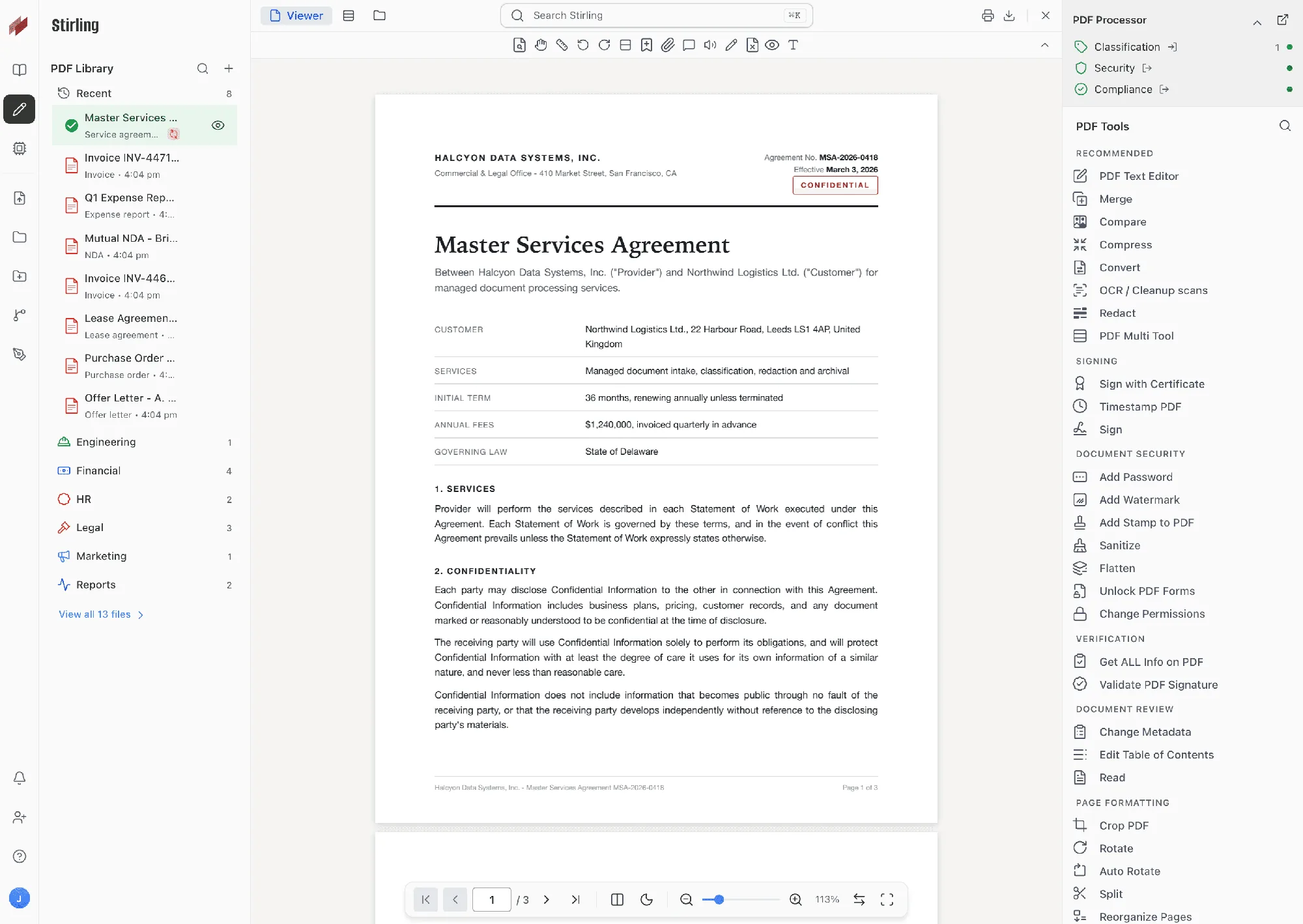
    • Add and remove passwords on PDFs
    • Add watermarks to PDFs
    • Dedicated page remover tool
    • Support for PDF permissions
    • Breaking change: the /home endpoint is removed and replaced with /
    • Fixed page titles

    Release notes on GitHub

Ready to edit your first PDF?

Free for individuals. Use it in your browser, install it on Windows, macOS or Linux, or self-host it with Docker.